Part I: XML Infoset, Canonical XML, and Digital Signatures
Part II: DOM Level III
Part III: XSLT 1.1 and Beyond
Part IV: XML Hypertext
The Infoset is the unfortunate standard to which those in retreat from the radical and most useful implications of well-formedness have rallied. At its core the Infoset insists that there is 'more' to XML than the straightforward syntax of well-formedness. By imposing its canonical semantics the Infoset obviates the infinite other semantic outcomes which might be elaborated in particular unique circumstances from an instance of well-formed XML 1.0 syntax. The question we should be asking is not whether the Infoset has chosen the correct canonical semantics, but whether the syntactic possibilities of XML 1.0 should be curtailed in this way at all.--Walter Perry on the xml-dev mailing list
<?xml version="1.0" encoding="UTF-8" standalone="no"?>
<?xml-stylesheet type="text/css" href="song.css"?>
<!DOCTYPE SONG SYSTEM "song.dtd">
<SONG xmlns="http://www.ibiblio.org/xml/namespace/song"
xmlns:xlink="http://www.w3.org/1999/xlink">
<TITLE>Hot Cop</TITLE>
<PHOTO
xlink:type="simple" xlink:show="onLoad" xlink:href="hotcop.jpg"
ALT="Victor Willis in Cop Outfit" WIDTH="100" HEIGHT="200"/>
<COMPOSER>Jacques Morali</COMPOSER>
<COMPOSER>Henri Belolo</COMPOSER>
<COMPOSER>Victor Willis</COMPOSER>
<PRODUCER>Jacques Morali</PRODUCER>
<!-- The publisher is actually Polygram but I needed
an example of a general entity reference. -->
<PUBLISHER xlink:type="simple" xlink:href="http://www.amrecords.com/">
A & M Records
</PUBLISHER>
<LENGTH>6:20</LENGTH>
<YEAR>1978</YEAR>
<ARTIST>Village People</ARTIST>
</SONG>
<!-- You can tell what album I was
listening to when I wrote this example -->
<?xml-stylesheet type="text/css" href="song.css"?>
<SONG xmlns="http://www.ibiblio.org/xml/namespace/song" xmlns:xlink="http://www.w3.org/1999/xlink">
<TITLE>Hot Cop</TITLE>
<PHOTO ALT="Victor Willis in Cop Outfit" HEIGHT="200" WIDTH="100" xlink:href="hotcop.jpg" xlink:show="onLoad" xlink:type="simple"></PHOTO>
<COMPOSER>Jacques Morali</COMPOSER>
<COMPOSER>Henri Belolo</COMPOSER>
<COMPOSER>Victor Willis</COMPOSER>
<PRODUCER>Jacques Morali</PRODUCER>
<PUBLISHER xlink:href="http://www.amrecords.com/" xlink:type="simple">
A & M Records
</PUBLISHER>
<LENGTH>6:20</LENGTH>
<YEAR>1978</YEAR>
<ARTIST>Village People</ARTIST>
</SONG>import org.apache.xerces.parsers.*;
import org.w3c.dom.*;
import org.xml.sax.*;
import java.io.*;
public class DOMHotCop {
public static void main(String[] args) {
DOMParser parser = new DOMParser();
try {
parser.parse("http://www.ibiblio.org/xml/examples/hot_cop.xml");
Document d = parser.getDocument();
}
catch (SAXException e) {
System.err.println(e);
}
catch (IOException e) {
System.err.println(e);
}
}
}The customary form of an XML document
The canonical form of an XML document
The object form of an XML document
A W3C proposed standard providing "a consistent set of definitions for use in other specifications that need to refer to the information in a well-formed XML document." This is considerably weaker than originally planned.
What it used to be: A W3C proposed standard for what is and is not significant in an XML document
Not everyone agrees that this is a good thing! or that this is the right list!
The Document Information Item
Element Information Items
Attribute Information Items
Processing Instruction Information Items
Internal Entity Information Items
External Entity Information Items
Unparsed Entity Information Items
Unexpanded Entity Information Items
Character Information Items
Comment Information Items
The Document Type Declaration Information Item
Notation Information Items
Entity Start Marker Information Items
Entity End Marker Information Items
CDATA Start Marker Information Items
CDATA End Marker Information Items
Namespace Information Items
Represents the entire document; not just the root element
Properties:
Children
One Element Information Item for the root element
One Comment Information Item for each Comment
One Processing Instruction Information Item for each Processing Instruction
Document Entity
Document Element
Notation Declarations
Entity Declarations
Base URI
Standalone Declaration
Version Declaration
<PHOTO
  xlink:type="simple" xlink:show="onLoad" xlink:href="hotcop.jpg"
  ALT="Victor Willis in Cop Outfit" WIDTH="100" HEIGHT="200"/>

<COMPOSER>Jacques Morali</COMPOSER>

<COMPOSER>
  <PERSON>
    <NAME>
      <FIRST>Henri</FIRST>
      <LAST>Belolo</LAST>
    </NAME>
  </PERSON>
</COMPOSER>

<rdf:RDF xmlns:rdf="http://www.w3.org/TR/REC-rdf-syntax#">
  <rdf:Description xmlns:dc="http://purl.org/dc/"
     about="http://www.ibiblio.org/examples/impressionists.xml">
    <dc:title> Impressionist Paintings </dc:title>
    <dc:creator> Elliotte Rusty Harold </dc:creator>
    <dc:description>
      A list of famous impressionist paintings organized
      by painter and date
    </dc:description>
    <dc:date>2000-08-22</dc:date>
  </rdf:Description>
</rdf:RDF>
An Element Information Item Includes:
namespace name; e.g. the absolute URI for the element's namespace
local name
prefix
children: a list of element, processing instruction, reference to skipped entity, character, and comment information items, one for each element, processing instruction, reference to an unprocessed external entity, data character, and comment appearing immediately within the current element
attributes: an unordered set of attribute information items, one for each of the attributes
(specified or defaulted from the DTD) of this element. xmlns attributes
declarations are not include.
namespace attributes: an unordered set of attribute information items, one for each of the namespaces declared either in the start-tag of this element or defaulted from the DTD.
in-scope namespaces: An unordered set of namespace information items, one for each of the namespaces in effect for this element
base URI: The absolute URI of the external entity in which this element appears, as defined in XML Base. If this is not known, this property is null.
parent
xlink:type="simple"
xlink:href="http://www.amrecords.com/"
xlink:type =  "simple"
xlink:show = "onLoad"
xlink:href="hotcop.jpg"
ALT="Victor Willis in Cop Outfit"
WIDTH=" 100 "
HEIGHT=' 200 '
An Attribute Information Item Includes:
namespace name
local name
prefix
normalized value
specified: A flag indicating whether this attribute was actually specified in the start-tag of its element, or was defaulted from the DTD
attribute type:
ID
IDREF
IDREFS
ENTITY
ENTITIES
NMTOKEN
NMTOKENS
NOTATION
CDATA
ENUMERATED
owner element
<!-- The publisher is actually Polygram but I needed
an example of a general entity reference. -->
<!-- <PUBLISHER xlink:type="simple" xlink:href="http://www.amrecords.com/">
A & M Records
</PUBLISHER>
<LENGTH>6:20</LENGTH>
<YEAR>1978</YEAR>
<ARTIST>Village People</ARTIST>
</SONG> -->
<!-- You can tell what album I was
listening to when I wrote this example -->
A comment Information Item includes:
content
parent
<?robots index="yes" follow="no"?>
<?php
  mysql_connect("database.unc.edu", "clerk", "password");
  $result = mysql("CYNW", "SELECT LastName, FirstName FROM Employees
    ORDER BY LastName, FirstName");
  $i = 0;
  while ($i < mysql_numrows ($result)) {
     $fields = mysql_fetch_row($result);
     echo "<person>$fields[1] $fields[0] </person>\r\n";
     $i++;
  }
  mysql_close();
?>
target
content
base URI
parent
A character is one Unicode character in the content of an element, attribute value, comment or processing instruction data.
A Character Information Item includes:
xmlns:rdf="http://www.w3.org/TR/REC-rdf-syntax#"
xmlns:dc="http://purl.org/dc/"
xmlns="http://www.w3.org/Graphics/SVG/SVG-19991203.dtd"
There is one namespace information item for each namespace actually used on an element or attribute somehwer ein the document.
A Namespace Information Item includes:
prefix
namespace name
<!DOCTYPE SONG SYSTEM "song.dtd">
<!DOCTYPE html PUBLIC "-//W3C//DTD XHTML 1.0 Strict//EN"
                       "http://www.w3.org/TR/xhtml1/DTD/xhtml1-strict.dtd">
A Document Type Declaration Information Item includes:
SYSTEM ID
PUBLIC ID
children: only the comment and processing instruction information items in the internal DTD subset and external DTD subsets.
<!ELEMENT SONG (TITLE, PHOTO?, COMPOSER+, PRODUCER*,
 PUBLISHER*, LENGTH?, YEAR?, ARTIST+)>
<!ATTLIST SONG xmlns       CDATA #REQUIRED
               xmlns:xlink CDATA #REQUIRED>
<!ELEMENT TITLE (#PCDATA)>

<!ELEMENT PHOTO EMPTY>
<!ATTLIST PHOTO xlink:type CDATA #FIXED "simple"
                xlink:href CDATA #REQUIRED
                xlink:show CDATA #IMPLIED
                ALT        CDATA #REQUIRED
                WIDTH      CDATA #REQUIRED
                HEIGHT     CDATA #REQUIRED
>

<!ELEMENT COMPOSER (#PCDATA)>
<!ELEMENT PRODUCER (#PCDATA)>
<!ELEMENT PUBLISHER (#PCDATA)>
<!ATTLIST PUBLISHER xlink:type CDATA #IMPLIED
                    xlink:href CDATA #IMPLIED
>

<!ELEMENT LENGTH (#PCDATA)>
<!-- This should be a four digit year like "1999",
     not a two-digit year like "99" -->
<!ELEMENT YEAR (#PCDATA)>

<!ELEMENT ARTIST (#PCDATA)>
There is no information item for this.
Comments and processing instructions in the DTD are reported as children the Document Type Declaration information item
Notation and general entity declarations are reported as properties of the Document information item
Attribute types and default values are reported on the actual attributes in the document instance.
Everything else is not reported!
An XML document is made up of one or more physical storage units called entities
Entity references :
Parsed internal general entity references like &
Parsed external general entity references
Unparsed external general entity references
External parameter entity references
Internal parameter entity references
Reading an XML document is not the same thing as reading an XML file
The file contains entity references.
The file document contains the entities' replacement text.
When you use a parser to read a document you'll get the text including characters like <. You will not see the entity references.
Entities are resolved when the document is parsed.
An entity start marker information item is reported immediately before each entity's replacement text.
An entity end marker information item is reported immediately before each entity's replacement text.
Each entity marker information item includes
entity
parent
Three kinds of entity information items:
Internal Entity Information Item
External Entity Information Item
Unparsed Entity Information Item
Plus Unexpanded Entity Information Items
Parameter entities are not reported
Name
Content
name
system identifier
public identifier
base URI
charset
name
system identifier
public identifier
Notation
name
entity
parent
The internal and external DTD subsets; especially
ELEMENT
and ATTLIST declarations
Document encoding
Character references (Problem for WML!)
Whether an empty element uses two tags or one
What kind of quotes surround attributes
Insignificant white space in attributes
White space that occurs between attributes
Attribute order
A W3C proposed standard serialization format of an XML document instance
Not everyone agrees that this is a good thing! or that this is the right format! It's totally unsuitable for editors and validation.
Based on the XPath data model
Not really InfoSet compatible
Something of this nature is nonetheless clearly needed for non-XML aware tools like digital signatures, change management, hash functions, and the like.
The document is encoded in UTF-8
Line breaks are normalized to a linefeed (ASCII , \n)
Attribute values are normalized, as if by a validating processor
Character and parsed entity references are replaced
CDATA sections are replaced with their character content
The XML and document type declarations are removed
Empty elements are converted to start tag-end tag pairs
White space outside of the document element and within start and end tags is normalized
All white space in character content is retained (except for characters removed during linefeed normalization)
Attribute value delimiters are set to double quotes
Special characters in attribute values and character content are replaced by character references
Superfluous namespace declarations are removed from each element
Default attributes are added to each element
Lexicographic order is imposed on the namespace declarations and attributes of each element
XML Canonicalizer from IBM's XML Security Suite: http://www.alphaworks.ibm.com/tech/xmlsecuritysuite
C14nDOM reads an XML document from stdin and writes the canonicalized output to stdout:
% java C14nDOM -xpath < hotcop.xml > canonicalized_hotcop.xml
-xpath option necessary to support October 26, 2000 working draft and later versions.
W3C/IETF Joint Candidate Recommendation, October 31, 2000
XML Signatures provide
Integrity
Message authentication
Signer authentication
For data of any type
Signed data can be located within the XML that includes the signature or elsewhere.
An enveloped signature is enclosed inside the XML element it signs
An enveloping signature signs XML data it contains.
A detached signature signs
data external to the Signature element,
possibly in another document entirely.
The signature processor digests a data object.
The processor places the digest value
in a Signature
element.
The processor digests the Signature
element.
The processor cryptographically signs
the Signature
element.
SampleSign2 and VerifyGUI from IBM's XML Security Suite: http://www.alphaworks.ibm.com/tech/xmlsecuritysuite
First use the JDK's keytool to generate a key:
% keytool -genkey -dname "CN=Elliotte Rusty Harold, OU=Metrotech, O=Polytechnic, L=Brooklyn, S=New York, C=US" -alias elharo -storepass mypassword -keypass mykeypassword
SampleSign2 reads an XML document from stdin and writes the signature to stdout:
C:\> java SampleSign2 elharo mypassword mykeypassword -ext http://www.ibiblio.org/xml/slides/hoffman/fundamentals/examples/hotcop.xml > hotcop_signature.xml
Key store: C:\Documents and Settings\Administrator\.keystore
Sign: 7030ms
VerifyGUI reads signature from stdinand warns of changes to signed content.
C:\>java VerifyGUI < hotcop_signature.xml
The signature has a KeyValue element.
The signature has one or more X509Data elements.
Checks an X509Data:
It has 1 certificate(s).
Certificate Information:
Version: 1
Validity: OK
SubjectDN: CN=Elliotte Rusty Harold, OU=Metrotech, O=Polytechnic, L=Brooklyn, ST=New York, C=US
IssuerDN: CN=Elliotte Rusty Harold, OU=Metrotech, O=Polytechnic, L=Brooklyn, ST=New York, C=US
Serial#: 983556890
Time to verify: 951 [msec]
<?xml version='1.0' encoding='UTF-8'?>
<Signature xmlns="http://www.w3.org/2000/09/xmldsig#">
  <SignedInfo>
    <CanonicalizationMethod Algorithm="http://www.w3.org/TR/2000/WD-xml-c14n-20000119"/>
    <SignatureMethod Algorithm="http://www.w3.org/2000/09/xmldsig#dsa-sha1"/>
    <Reference URI="http://www.ibiblio.org/xml/slides/hoffman/fundamentals/examples/hotcop.xml">
      <DigestMethod Algorithm="http://www.w3.org/2000/09/xmldsig#sha1"/>
      <DigestValue>nvfYilfgN/rICyzhGmjidKCFoC8=</DigestValue>
    </Reference>
  </SignedInfo>
  <SignatureValue>
    hfowa4qdbuMkoZfX1/VXd4UBpIpZMM5+6CElmY7jOIKFqvXq5A5VKw==
  </SignatureValue>
  <KeyInfo>
    <KeyValue>
      <DSAKeyValue>
        <P>
          /X9TgR11EilS30qcLuzk5/YRt1I870QAwx4/gLZRJmlFXUAiUftZPY1Y+r/F9bow9s
          ubVWzXgTuAHTRv8mZgt2uZUKWkn5/oBHsQIsJPu6nX/rfGG/g7V+fGqKYVDwT7g/bT
          xR7DAjVUE1oWkTL2dfOuK2HXKu/yIgMZndFIAcc=
        </P>
        <Q>l2BQjxUjC8yykrmCouuEC/BYHPU=</Q>
        <G>
          9+GghdabPd7LvKtcNrhXuXmUr7v6OuqC+VdMCz0HgmdRWVeOutRZT+ZxBxCBgLRJFn
          Ej6EwoFhO3zwkyjMim4TwWeotUfI0o4KOuHiuzpnWRbqN/C/ohNWLx+2J6ASQ7zKTx
          vqhRkImog9/hWuWfBpKLZl6Ae1UlZAFMO/7PSSo=
        </G>
        <Y>
          6jKpNnmkkWeArsn5Oeeg2njcz+nXdk0f9kZI892ddlR8Lg1aMhPeFTYuoq3I6neFlb
          BjWzuktNZKiXYBfKsSTB8U09dTiJo2ir3HJuY7eW/p89osKMfixPQsp9vQMgzph6Qa
          lY7j4MB7y5ROJYsTr1/fFwmj/yhkHwpbpzed1LE=
        </Y>
      </DSAKeyValue>
    </KeyValue>
    <X509Data>
      <X509IssuerSerial>
        <X509IssuerName>CN=Elliotte Rusty Harold, OU=Metrotech, O=Polytechnic, L=Brooklyn, ST=New York, C=US</X509IssuerName>
        <X509SerialNumber>983556890</X509SerialNumber></X509IssuerSerial>
      <X509SubjectName>CN=Elliotte Rusty Harold, OU=Metrotech, O=Polytechnic, L=Brooklyn, ST=New York, C=US</X509SubjectName>
      <X509Certificate>
MIIDLzCCAu0CBDqf4xowCwYHKoZIzjgEAwUAMH0xCzAJBgNVBAYTAlVTMREwDwYDVQQIEwhOZXcg
WW9yazERMA8GA1UEBxMIQnJvb2tseW4xFDASBgNVBAoTC1BvbHl0ZWNobmljMRIwEAYDVQQLEwlN
ZXRyb3RlY2gxHjAcBgNVBAMTFUVsbGlvdHRlIFJ1c3R5IEhhcm9sZDAeFw0wMTAzMDIxODE0NTBa
Fw0wMTA1MzExODE0NTBaMH0xCzAJBgNVBAYTAlVTMREwDwYDVQQIEwhOZXcgWW9yazERMA8GA1UE
BxMIQnJvb2tseW4xFDASBgNVBAoTC1BvbHl0ZWNobmljMRIwEAYDVQQLEwlNZXRyb3RlY2gxHjAc
BgNVBAMTFUVsbGlvdHRlIFJ1c3R5IEhhcm9sZDCCAbgwggEsBgcqhkjOOAQBMIIBHwKBgQD9f1OB
HXUSKVLfSpwu7OTn9hG3UjzvRADDHj+AtlEmaUVdQCJR+1k9jVj6v8X1ujD2y5tVbNeBO4AdNG/y
ZmC3a5lQpaSfn+gEexAiwk+7qdf+t8Yb+DtX58aophUPBPuD9tPFHsMCNVQTWhaRMvZ1864rYdcq
7/IiAxmd0UgBxwIVAJdgUI8VIwvMspK5gqLrhAvwWBz1AoGBAPfhoIXWmz3ey7yrXDa4V7l5lK+7
+jrqgvlXTAs9B4JnUVlXjrrUWU/mcQcQgYC0SRZxI+hMKBYTt88JMozIpuE8FnqLVHyNKOCjrh4r
s6Z1kW6jfwv6ITVi8ftiegEkO8yk8b6oUZCJqIPf4VrlnwaSi2ZegHtVJWQBTDv+z0kqA4GFAAKB
gQDqMqk2eaSRZ4Cuyfk556DaeNzP6dd2TR/2Rkjz3Z12VHwuDVoyE94VNi6ircjqd4WVsGNbO6S0
1kqJdgF8qxJMHxTT11OImjaKvccm5jt5b+nz2iwox+LE9Cyn29AyDOmHpBqVjuPgwHvLlE4lixOv
X98XCaP/KGQfClunN53UsTALBgcqhkjOOAQDBQADLwAwLAIUODqxsFzS96BjrVA4LVo5FzuWBRMC
FC0xfXxbaJaCJuVqtcBv4bqwV0EX
      </X509Certificate>
    </X509Data>
  </KeyInfo>
</Signature>
XML InfoSet Specification: http://www.w3.org/TR/xml-infoset
Canonical XML Specification: http://www.w3.org/TR/xml-c14n
XML Signature Specification: http://www.w3.org/TR/xmldsig-core/
An XML document is a tree.
It has a root.
It has nodes.
It is amenable to recursive processing.
Not all applications agree on what the root is.
Not all applications agree on what is and isn't a node.
Defines how XML and HTML documents are represented as objects in programs
Defined in the Interface Definition Language (IDL) from the OMG; thus language independent
HTML as well as XML
Writing as well as reading
More complete than SAX; covers everything except internal and external DTD subsets
DOM focuses more on the document; SAX focuses more on the parser.
DOM Level 0: what was implemented for JavaScript in netscape 3/IE3
DOM Level 1, a W3C Standard
DOM Level 2, a W3C Standard
DOM Level 3: Several Working Drafts:
Apache XML Project's Xerces Java: http://xml.apache.org/xerces-j/
IBM's XML for Java: http://www.alphaworks.ibm.com/formula/xml
Sun's Java API for XML http://java.sun.com/products/xml
None yet support DOM3
Eight Modules:
Core: org.w3c.dom *
HTML: org.w3c.dom.html
Views: org.w3c.dom.views
StyleSheets: org.w3c.dom.stylesheets
CSS: org.w3c.dom.css
Events: org.w3c.dom.events *
Traversal: org.w3c.dom.traversal *
Range: org.w3c.dom.range
Only the core and traversal modules really apply to XML. The other six are for HTML.
* indicates Xerces support
Entire document is represented as a tree.
A tree contains nodes.
Some nodes may contain other nodes (depending on node type).
Each document node contains:
zero or one doctype nodes
one root element node
zero or more comment and processing instruction nodes
17 classes:
Attr
CDATASection
CharacterData
Comment
Document
DocumentFragment
DocumentType
DOMImplementation
Element
Entity
EntityReference
NamedNodeMap
Node
NodeList
Notation
ProcessingInstruction
Text
plus one exception:
DOMException
Plus a bunch of HTML stuff in org.w3c.dom.html
and other packages
we will ignore
package org.w3c.dom;

public interface Node {

  // NodeType
  public static final short ELEMENT_NODE                = 1;
  public static final short ATTRIBUTE_NODE              = 2;
  public static final short TEXT_NODE                   = 3;
  public static final short CDATA_SECTION_NODE          = 4;
  public static final short ENTITY_REFERENCE_NODE       = 5;
  public static final short ENTITY_NODE                 = 6;
  public static final short PROCESSING_INSTRUCTION_NODE = 7;
  public static final short COMMENT_NODE                = 8;
  public static final short DOCUMENT_NODE               = 9;
  public static final short DOCUMENT_TYPE_NODE          = 10;
  public static final short DOCUMENT_FRAGMENT_NODE      = 11;
  public static final short NOTATION_NODE               = 12;

  public String       getNodeName();
  public String       getNodeValue() throws DOMException;
  public void         setNodeValue(String nodeValue) throws DOMException;
  public short        getNodeType();
  public Node         getParentNode();
  public NodeList     getChildNodes();
  public Node         getFirstChild();
  public Node         getLastChild();
  public Node         getPreviousSibling();
  public Node         getNextSibling();
  public NamedNodeMap getAttributes();
  public Document     getOwnerDocument();
  public Node         insertBefore(Node newChild, Node refChild) throws DOMException;
  public Node         replaceChild(Node newChild, Node oldChild) throws DOMException;
  public Node         removeChild(Node oldChild) throws DOMException;
  public Node         appendChild(Node newChild) throws DOMException;
  public boolean      hasChildNodes();
  public Node         cloneNode(boolean deep);
  public void         normalize();
  public boolean      supports(String feature, String version);
  public String       getNamespaceURI();
  public String       getPrefix();
  public void         setPrefix(String prefix) throws DOMException;
  public String       getLocalName();
}
package org.w3c.dom;

public interface NodeList {
  public Node item(int index);
  public int  getLength();
}
Now we're really ready to read a document
import org.apache.xerces.parsers.*;
import org.w3c.dom.*;
import org.xml.sax.*;
import java.io.*;


public class NodeReporter {

  public static void main(String[] args) {

    DOMParser parser = new DOMParser();
    NodeReporter iterator = new NodeReporter();

    for (int i = 0; i < args.length; i++) {
      try {
        // Read the entire document into memory
        parser.parse(args[i]);

        Document doc = parser.getDocument();
        iterator.followNode(doc);
      }
      catch (SAXException e) {
        System.err.println(e);
      }
      catch (IOException e) {
        System.err.println(e);
      }

    }

  } // end main

  // note use of recursion
  public void followNode(Node node) {

    processNode(node);
    if (node.hasChildNodes()) {
      NodeList children = node.getChildNodes();
      for (int i = 0; i < children.getLength(); i++) {
        followNode(children.item(i));
      }
    }

  }

  public void processNode(Node node) {

    String name = node.getNodeName();
    String type = getTypeName(node.getNodeType());
    System.out.println("Type " + type + ": " + name);

  }

  public static String getTypeName(int type) {

    switch (type) {
      case Node.ELEMENT_NODE: return "Element";
      case Node.ATTRIBUTE_NODE: return "Attribute";
      case Node.TEXT_NODE: return "Text";
      case Node.CDATA_SECTION_NODE: return "CDATA Section";
      case Node.ENTITY_REFERENCE_NODE: return "Entity Reference";
      case Node.ENTITY_NODE: return "Entity";
      case Node.PROCESSING_INSTRUCTION_NODE: return "Processing Instruction";
      case Node.COMMENT_NODE : return "Comment";
      case Node.DOCUMENT_NODE: return "Document";
      case Node.DOCUMENT_TYPE_NODE: return "Document Type Declaration";
      case Node.DOCUMENT_FRAGMENT_NODE: return "Document Fragment";
      case Node.NOTATION_NODE: return "Notation";
      default: return "Unknown Type";
    }

  }

}% java NodeReporter hotcop.xml Type Document: #document Type Processing Instruction: xml-stylesheet Type Document Type Declaration: SONG Type Element: SONG Type Text: #text Type Element: TITLE Type Text: #text Type Text: #text Type Element: PHOTO Type Text: #text Type Element: COMPOSER Type Text: #text Type Text: #text Type Element: COMPOSER Type Text: #text Type Text: #text Type Element: COMPOSER Type Text: #text Type Text: #text Type Element: PRODUCER Type Text: #text Type Text: #text Type Comment: #comment Type Text: #text Type Element: PUBLISHER Type Text: #text Type Text: #text Type Element: LENGTH Type Text: #text Type Text: #text Type Element: YEAR Type Text: #text Type Text: #text Type Element: ARTIST Type Text: #text Type Text: #text Type Comment: #comment
Attributes are missing from this output. They are not nodes. They are properties of nodes.
| Node Type | Node Value |
|---|---|
| element node | null |
| attribute node | attribute value |
| text node | text of the node |
| CDATA section node | text of the section |
| entity reference node | null |
| entity node | null |
| processing instruction node | content of the processing instruction, not including the target |
| comment node | text of the comment |
| document node | null |
| document type declaration node | null |
| document fragment node | null |
| notation node | null |
Grammar access; a.k.a content models (DTDs and schemas)
Extra attributes on Entity,
Document, Node,
and Text interfaces
Standard means of loading and saving XML documents.
Bootstrapping new documents
Key events
DOMKey
Node3
Document3
Text3
Entity3
Bootstrapping
Every node gets a unique key automatically generated by the DOM implementation to uniquely identify DOM nodes.
Type, attributes, and methods of the DOMKey interface
remain to be determined
Extends DOM2 Node.
Adds:
In IDL:
interface Node3 {

  readonly attribute DOMString baseURI;

  typedef enum _DocumentOrder {
    DOCUMENT_ORDER_PRECEDING,
    DOCUMENT_ORDER_FOLLOWING,
    DOCUMENT_ORDER_SAME,
    DOCUMENT_ORDER_UNORDERED
  };
  DocumentOrder;
  DocumentOrder compareDocumentOrder(in Node other) raises(DOMException);

  typedef enum _TreePosition {
    TREE_POSITION_PRECEDING,
    TREE_POSITION_FOLLOWING,
    TREE_POSITION_ANCESTOR,
    TREE_POSITION_DESCENDANT,
    TREE_POSITION_SAME,
    TREE_POSITION_UNORDERED
  };
  TreePosition;
  TreePosition compareTreePosition(in Node other) raises(DOMException);
           attribute DOMString textContent;
  readonly attribute DOMKey    key;

  boolean    isSameNode(in Node other);
  DOMString  lookupNamespacePrefix(in DOMString namespaceURI);
  DOMString  lookupNamespaceURI(in DOMString prefix);
  void       normalizeNS();
  boolean    equalsNode(in Node arg, in boolean deep);
};
Java binding:
package org.w3c.dom;

public interface Node3 {

  public String getBaseURI();

  public static final int DOCUMENT_ORDER_PRECEDING = 1;
  public static final int DOCUMENT_ORDER_FOLLOWING = 2;
  public static final int DOCUMENT_ORDER_SAME      = 3;
  public static final int DOCUMENT_ORDER_UNORDERED = 4;

  public int compareDocumentOrder(Node other) throws DOMException;

  public static final int TREE_POSITION_PRECEDING  = 1;
  public static final int TREE_POSITION_FOLLOWING  = 2;
  public static final int TREE_POSITION_ANCESTOR   = 3;
  public static final int TREE_POSITION_DESCENDANT = 4;
  public static final int TREE_POSITION_SAME       = 5;
  public static final int TREE_POSITION_UNORDERED  = 6;

  public int compareTreePosition(Node other) throws DOMException;

  public String getTextContent();
  public void   setTextContent(String textContent);

  public boolean isSameNode(Node other);
  public boolean equalsNode(Node arg, boolean deep);

  public String lookupNamespacePrefix(String namespaceURI);
  public String lookupNamespaceURI(String prefix);
  public void   normalizeNS();

  public Object getKey();

}
XML documents may be built from multiple parsed entities, each of which is not necessarily a well-formed XML document, but is at least a plausible part of a well-formed XML document.
Each entity may have its own text declaration.
This is like an XML declaration without a standalone attribute
and with an optional version attribute:
<?xml version="1.0"?>
<?xml version="1.0" encoding="ISO-8859-9"?>
<?xml encoding="ISO-8859-9"?>
DOM3
Entity3 extends DOM2 Entity to add information from
text declarations
Adds:
In IDL:
interface Entity3 : Entity {
  attribute DOMString  actualEncoding;
  attribute DOMString  encoding;
  attribute DOMString  version;
};
Java binding:
package org.w3c.dom;

public interface Entity3 extends Entity {

  public String getActualEncoding();
  public void   setActualEncoding(String actualEncoding);
  public String getEncoding();
  public void   setEncoding(String encoding);
  public String getVersion();
  public void   setVersion();

}
Extends DOM2 Document.
Adds:
<?xml version="1.0"?>
<?xml version="1.0" encoding="ISO-8859-9"?>
<?xml version="1.0" encoding="ISO-8859-9" standalone="no"?>
<?xml version="1.0" standalone="yes"?>
adoptNode()In IDL:
interface Document3 : Document {
  attribute DOMString actualEncoding;
  attribute DOMString encoding;
  attribute boolean   standalone;
  attribute boolean   strictErrorChecking;
  attribute DOMString version;

  Node adoptNode(in Node source) raises(DOMException);
};
Java binding:
package org.w3c.dom;

public interface Document3 extends Document {

  public String  getActualEncoding();
  public void    setActualEncoding(String actualEncoding);

  public String  getEncoding();
  public void    setEncoding(String encoding);

  public boolean getStandalone();
  public void    setStandalone(boolean standalone);

  public boolean getStrictErrorChecking();
  public void    setStrictErrorChecking(boolean strictErrorChecking);

  public String  getVersion();
  public void    setVersion(String version);

  public Node    adoptNode(Node source) throws DOMException;

}
Extends DOM2 Text interface
Adds:
isWhitespaceInElementContent()In IDL:
interface Text3 : Text {
  readonly attribute boolean isWhitespaceInElementContent;
};
Java binding:
package org.w3c.dom;

  public interface Text3 extends Text {

    public boolean getIsWhitespaceInElementContent();

  }
DOM2 has no implementation-independent means to create
a new Document object
Implementation-dependent methods tend to be fairly complex. For example, in Xerces-J:
DOMImplementation impl = DOMImplementationImpl.getDOMImplementation();

Document fibonacci = impl.createDocument(null, "Fibonacci_Numbers", null);
Still no language-independent means to create
a new Document object
Does provide an implementation-independent method for Java only:
DOMImplementation impl = DOMImplementationFactory.getDOMImplementation();
package org.w3c.dom;

public abstract class DOMImplementationFactory {

  // The system property to specify the DOMImplementation class name.
  private static String property = "org.w3c.dom.DOMImplementation";

  // The default DOMImplementation class name to use.
  private static String defaultImpl = "NO DEFAULT IMPLEMENTATION SET";

   public static DOMImplementation getDOMImplementation()
     throws ClassNotFoundException, InstantiationException,
            IllegalAccessException, ClassCastException {
     // Retrieve the system property
     String impl;
     try {
       impl = System.getProperty(property, defaultImpl);
     }
     catch (SecurityException e) {
       // fallback on default implementation in case of security problem
       impl = defaultImpl;
     }

     // Attempt to load, instantiate and return the implementation class
     return (DOMImplementation) Class.forName(impl).newInstance();
  }

}
Loading: parsing an existing XML document
to produce a Document object
Saving: serializing a Document object
into a file or onto a stream
Completely implementation dependent in DOM2
Library specific code creates a parser
The parser parses the document and returns a DOM
org.w3c.dom.Document object.
The entire document is stored in memory.
DOM methods and interfaces are used to extract data from this object
This program parses with Xerces. Other parsers are different.
import org.apache.xerces.parsers.*;
import org.w3c.dom.*;
import org.xml.sax.*;
import java.io.*;

public class DOMParserMaker {

  public static void main(String[] args) {

    DOMParser parser = new DOMParser();

    for (int i = 0; i < args.length; i++) {
      try {
        parser.parse(args[i]);

        Document d = parser.getDocument();
      }
      catch (SAXException e) {
        System.err.println(e);
      }
      catch (IOException e) {
        System.err.println(e);
      }

    }

  }

}import org.w3c.dom.*;
public class DOM3ParserMaker {
public static void main(String[] args) {
DOMImplementationFactoryLS impl =
(DOMImplementationLS) DOMImplementationFactory.getDOMImplementation();
DOMBuilder parser = impl.getDOMBuilder();
for (int i = 0; i < args.length; i++) {
try {
Document d = parser.parseURI(args[i]);
}
catch (DOMSystemException e) {
System.err.println(e);
}
catch (DOMException e) {
System.err.println(e);
}
}
}
}This code will not actually compile or run until some parser supports DOM3 Load and Save.
DOMImplementationLSDOMImplementation interface that provides the factory
methods for creating the objects
required for loading and saving.DOMBuilderDOMInputSourceInputSource DOMEntityResolverDOMBuilderFilterElement nodes as
they are being processed during the parsing of a document.
like SAX filters.
DOMWriterFactory interface to create new
DOMBuilder and DOMWriter
implementations.
IDL:
  interface DOMImplementationLS {
    DOMBuilder  createDOMBuilder();
    DOMWriter   createDOMWriter();
  };
Java Binding:
package org.w3c.dom.loadSave;

public interface DOMImplementationLS {

    public DOMBuilder createDOMBuilder();
    public DOMWriter  createDOMWriter();

}
Provides an implementation-independent
API for parsing XML documents to produce a DOM
Document object.
Instances are built by the
createDOMBuilder() method in DOMImplementationLS.
IDL:
  interface DOMBuilder {
    attribute DOMEntityResolver entityResolver;
    attribute DOMErrorHandler   errorHandler;
    attribute DOMBuilderFilter  filter;

    void      setFeature(in DOMString name,
                         in boolean state)
                            raises(dom::DOMException);
    boolean   supportsFeature(in DOMString name);
    boolean   canSetFeature(in DOMString name,
                            in boolean state);
    boolean   getFeature(in DOMString name)
                          raises(dom::DOMException);
    Document  parseURI(in DOMString uri)
                        raises(dom::DOMException, dom::DOMSystemException);
    Document  parseDOMInputSource(in DOMInputSource is)
                                     raises(dom::DOMException,
                                            dom::DOMSystemException);
  };
Java Binding:
package org.w3c.dom.loadSave;

public interface DOMBuilder {

    public DOMEntityResolver getEntityResolver();
    public void setEntityResolver(DOMEntityResolver entityResolver);

    public DOMErrorHandler getErrorHandler();
    public void setErrorHandler(DOMErrorHandler errorHandler);

    public DOMBuilderFilter getFilter();
    public void setFilter(DOMBuilderFilter filter);

    public void setFeature(String name, boolean state)
      throws DOMException;
    public boolean supportsFeature(String name);
    public boolean canSetFeature(String name, boolean state);
    public boolean getFeature(String name) throws DOMException;
    public Document parseURI(String uri)
      throws DOMException, DOMSystemException;
    public Document parseDOMInputSource(DOMInputSource is)
     throws DOMException, DOMSystemException;

}
Like SAX2's InputSource
class,
this interface is an abstration of all the different things
(streams, files, byte arrays, sockets, URLs, etc.) from which
an XML document can be read.
IDL:
  interface DOMInputSource {
    attribute DOMInputStream  byteStream;
    attribute DOMReader       characterStream;
    attribute DOMString       encoding;
    attribute DOMString       publicId;
    attribute DOMString       systemId;
  };
Java Binding:
package org.w3c.dom.loadSave;

public interface DOMInputSource {

    public InputStream getByteStream();
    public void        setByteStream(InputStream in);
    public Reader      getCharacterStream();
    public void        setCharacterStream(Reader in);

    public String getEncoding();
    public void   setEncoding(String encoding);
    public String getPublicId();
    public void   setPublicId(String publicId);
    public String getSystemId();
    public void   setSystemId(String systemId);

}
Like SAX2's EntityResolver interface,
this interface lets applications redirect references to external entities.
IDL:
  interface DOMEntityResolver {
    DOMInputSource resolveEntity(in DOMString publicId,
                                 in DOMString systemId )
                                    raises(dom::DOMSystemException);
  };
Java Binding:
package org.w3c.dom.loadSave;

public interface DOMEntityResolver {

    public DOMInputSource resolveEntity(String publicId,
      String systemId ) throws DOMSystemException;

}
Provides an API for serializing (writing) a DOM document out as a sequence of bytes onto a stream, file, socket, byte array, etc.
IDL:
  interface DOMWriter {
             attribute DOMString encoding;
    readonly attribute DOMString lastEncoding;
             attribute unsigned short format;
    // Modified in DOM Level 3:
             attribute DOMString newLine;
    void  writeNode(in DOMOutputStream destination, in Node node)
                       raises(dom::DOMSystemException);
  };
Java Binding:
package org.w3c.dom.loadSave;

public interface DOMWriter {

    public String getEncoding();
    public void   setEncoding(String encoding);
    public String getLastEncoding();
    public short  getFormat();
    public void   setFormat(short format);
    public String getNewLine();
    public void   setNewLine(String newLine);
    public void   writeNode(OutputStream out, Node node)
      throws DOMSystemException;

}
Lets applications examine element nodes as they are being constructed during a parse.
As each element is examined, it may be modified or removed, or parsing may be aborted.
IDL:
  interface DOMBuilderFilter {
    boolean endElement(in Element element);
  };
Java Binding:
package org.w3c.dom.loadSave;

public interface DOMBuilderFilter {

  public boolean endElement(Element element);

}
Content Model and CM-Editing Interfaces:
CMModel
CMExternalModel
CMNode
CMNodeList
CMNamedNodeMap
CMDataType
ElementDeclaration
CMChildren
AttributeDeclaration
EntityDeclaration
CMNotationDeclaration
Validation and Other Interfaces:
Document
DocumentCM
DOMImplementationCM
Document-Editing Interfaces:
NodeCM
ElementCM
CharacterDataCM
DocumentTypeCM
AttributeCM
DOM Error Handler Interfaces:
DOMErrorHandler
DOMLocator
DOMImplementation.hasFeature("CM-EDIT")
returns true if
a given DOM supports these interfaces for editing content models.
CMModel
CMExternalModel
CMNode
CMNodeList
CMNamedNodeMap
CMDataType
ElementDeclaration
CMChildren
AttributeDeclaration
EntityDeclaration
CMNotationDeclaration
Represents an abstract content model that could be a DTD, an XML Schema, a database schema, or something else. It has both an internal and external subset.
IDL:
  interface CMModel : CMNode {
    readonly attribute boolean          isNamespaceAware;
    readonly attribute ElementDeclaration  rootElementDecl;
    DOMString          getLocation();
    nsElement          getCMNamespace();
    CMNamedNodeMap     getCMNodes();
    boolean            removeNode(in CMNode node);
    boolean            insertBefore(in CMNode newNode,
                                    in CMNode refNode);
    boolean            validate();
  };
Java binding:
package org.w3c.dom.contentModel;

public interface CMModel extends CMNode {

    public boolean getIsNamespaceAware();
    public ElementDeclaration getRootElementDecl();
    public String getLocation();
    public nsElement getCMNamespace();
    public CMNamedNodeMap getCMNodes();
    public boolean removeNode(CMNode node);
    public boolean insertBefore(CMNode newNode, CMNode refNode);
    public boolean validate();

}
A CMModel that is not bound to a particular document,
and can thus be shared among documents.
IDL:
  interface CMExternalModel : CMModel {
  };
Java binding:
package org.w3c.dom.contentModel;

public interface CMExternalModel extends CMModel {
}
The node for the various kinds of declarations out of which
CMModels are built
IDL:
  interface CMNode {
    const unsigned short ELEMENT_DECLARATION     = 1;
    const unsigned short ATTRIBUTE_DECLARATION   = 2;
    const unsigned short CM_NOTATION_DECLARATION = 3;
    const unsigned short ENTITY_DECLARATION      = 4;
    const unsigned short CM_CHILDREN             = 5;
    const unsigned short CM_MODEL                = 6;
    const unsigned short CM_EXTERNALMODEL        = 7;

    readonly attribute unsigned short cmNodeType;

    CMNode             cloneCM();
    CMNode             cloneExternalCM();
  };
Java binding:
package org.w3c.dom.contentModel;

public interface CMNode {

    public static final short ELEMENT_DECLARATION       = 1;
    public static final short ATTRIBUTE_DECLARATION     = 2;
    public static final short CM_NOTATION_DECLARATION   = 3;
    public static final short ENTITY_DECLARATION        = 4;
    public static final short CM_CHILDREN               = 5;
    public static final short CM_MODEL                  = 6;
    public static final short CM_EXTERNALMODEL          = 7;

    public short  getCmNodeType();
    public CMNode cloneCM();
    public CMNode cloneExternalCM();

}
An ordered list of the nodes in a content model
IDL:
  interface CMNodeList {
  };
Java binding:
package org.w3c.dom.contentModel;

public interface CMNodeList {
}
An unordered set of CM nodes
IDL:
  interface CMNamedNodeMap {
  };
Java binding:
package org.w3c.dom.contentModel;

public interface CMNamedNodeMap {
}
Primitive data types used in content models
This one is a little weak
IDL:
  interface CMDataType {
    const     short STRING_DATATYPE  = 1;
    const     short BOOLEAN_DATATYPE = 2;
    const     short FLOAT_DATATYPE   = 3;
    const     short DOUBLE_DATATYPE  = 4;
    const     short LONG_DATATYPE    = 5;
    const     short INT_DATATYPE     = 6;
    const     short SHORT_DATATYPE   = 7;
    const     short BYTE_DATATYPE    = 8;

    attribute int   lowValue;
    attribute int   highValue;

              short getPrimitiveType();
  };
Java binding:
package org.w3c.dom.contentModel;

public interface CMDataType {

    public static final short STRING_DATATYPE  = 1;
    public static final short BOOLEAN_DATATYPE = 2;
    public static final short FLOAT_DATATYPE   = 3;
    public static final short DOUBLE_DATATYPE  = 4;
    public static final short LONG_DATATYPE    = 5;
    public static final short INT_DATATYPE     = 6;
    public static final short SHORT_DATATYPE   = 7;
    public static final short BYTE_DATATYPE    = 8;

    public int  getLowValue();
    public void setLowValue(int lowValue);
    public int  getHighValue();
    public void setHighValue(int highValue);

    public short getPrimitiveType();

}
Represents a declaration of an element such as
<!ELEMENT TIME (#PCDATA)>
or an xsd:element schema element
IDL:
  interface ElementDeclaration {
    int            getContentType();
    CMChildren     getCMChildren();
    CMNamedNodeMap getCMAttributes();
    CMNamedNodeMap getCMGrandChildren();
  };
Java binding:
package org.w3c.dom.contentModel;

public interface ElementDeclaration {

    public int            getContentType();
    public CMChildren     getCMChildren();
    public CMNamedNodeMap getCMAttributes();
    public CMNamedNodeMap getCMGrandChildren();

}
Represents an element in the context of a CMNode.
IDL:
  interface CMChildren {
             attribute DOMString      listOperator;
             attribute CMDataType     elementType;
             attribute int            multiplicity;
             attribute CMNamedNodeMap subModels;
    readonly attribute boolean        isPCDataOnly;
  };
Java binding:
package org.w3c.dom.contentModel;

public interface CMChildren {

    public String     getListOperator();
    public void       setListOperator(String listOperator);
    public CMDataType getElementType();
    public void       setElementType(CMDataType elementType);

    public int            getMultiplicity();
    public void           setMultiplicity(int multiplicity);
    public CMNamedNodeMap getSubModels();
    public void           setSubModels(CMNamedNodeMap subModels);
    public boolean        getIsPCDataOnly();

}
Represents a declaration of an attribute; e.g. an xsd:attribute schema element
oe
<!ATTLIST TIME HOURS CDATA #IMPLIED>
IDL:
  interface AttributeDeclaration {
    const short NO_VALUE_CONSTRAINT      = 0;
    const short DEFAULT_VALUE_CONSTRAINT = 1;
    const short FIXED_VALUE_CONSTRAINT   = 2;

    readonly attribute DOMString  attrName;
             attribute CMDataType attrType;
             attribute DOMString  attributeValue;
             attribute DOMString  enumAttr;
             attribute CMNodeList ownerElement;
             attribute short      constraintType;
  };
Java binding:
package org.w3c.dom.contentModel;

public interface AttributeDeclaration {

    public static final short NO_VALUE_CONSTRAINT       = 0;
    public static final short DEFAULT_VALUE_CONSTRAINT  = 1;
    public static final short FIXED_VALUE_CONSTRAINT    = 2;

    public String     getAttrName();
    public CMDataType getAttrType();
    public void       setAttrType(CMDataType attrType);
    public String     getAttributeValue();
    public void       setAttributeValue(String value);
    public String     getEnumAttr();
    public void       setEnumAttr(String enumAttr);
    public CMNodeList getOwnerElement();
    public void       setOwnerElement(CMNodeList ownerElement);
    public short      getConstraintType();
    public void       setConstraintType(short constraintType);

}
Represents a declaration of an entity; e.g.
<!ENTITY COPY01 "Copyright 2001 Elliotte Harold">
IDL:
  interface EntityDeclaration {
  };
Java binding:
package org.w3c.dom.contentModel;

public interface EntityDeclaration {
}
Represents a declaration of a notation; e.g.
<!NOTATION TXT SYSTEM "text/plain">
IDL:
  interface CMNotationDeclaration {
             attribute DOMString strSystemIdentifier;
             attribute DOMString strPublicIdentifier;
  };
Java binding:
package org.w3c.dom.contentModel;

public interface CMNotationDeclaration {

    public String getStrSystemIdentifier();
    public void   setStrSystemIdentifier(String strSystemIdentifier);
    public String getStrPublicIdentifier();
    public void   setStrPublicIdentifier(String strPublicIdentifier);

}
Document
DocumentCM
DOMImplementationCM
The DOM2 Document interface gets
a new setErrorHandler() method
IDL:
  interface Document {
    void setErrorHandler(in DOMErrorHandler handler);
  };
Java binding:
package org.w3c.dom.contentModel;

public interface Document {

    public void setErrorHandler(DOMErrorHandler handler);

}
The different specs aren't syncedup on this one yet.
Extends the
Document interface with additional methods for both
document and CM
editing.
IDL:
interface DocumentCM : Document {
  int                numCMs();
  CMModel            getInternalCM();
  CMExternalModel *  getCMs();
  CMModel            getActiveCM();
  void               addCM(in CMModel cm);
  void               removeCM(in CMModel cm);
  boolean            activateCM(in CMModel cm);
};
Java binding:
package org.w3c.dom.contentModel;

public interface DocumentCM extends Document {

    public int             numCMs();
    public CMModel         getInternalCM();
    public CMExternalModel getCMs();
    public CMModel         getActiveCM();
    public void            addCM(CMModel cm);
    public void            removeCM(CMModel cm);
    public boolean         activateCM(CMModel cm);

}
Extends the DOM2
DOMImplementation
interface with factory methods to create
content models
IDL:
  interface DOMImplementationCM : DOMImplementation {
    CMModel         createCM();
    CMExternalModel createExternalCM();
  };
Java binding:
package org.w3c.dom.contentModel;

public interface DOMImplementationCM extends DOMImplementation {

    public CMModel         createCM();
    public CMExternalModel createExternalCM();

}
DOMImplementation.hasFeature("CM-DOC")
returns true if
a given DOM supports these capabilities.
NodeCM
ElementCM
CharacterDataCM
DocumentTypeCM
AttributeCM
Extends the DOM2 Node interface with methods for
guided document editing.
IDL:
  interface NodeCM : Node {
    boolean canInsertBefore(in Node newChild,
                            in Node refChild)
                               raises(dom::DOMException);
    boolean canRemoveChild(in Node oldChild)
                              raises(dom::DOMException);
    boolean canReplaceChild(in Node newChild,
                            in Node oldChild)
                               raises(dom::DOMException);
    boolean canAppendChild(in Node newChild)
                              raises(dom::DOMException);
    boolean isValid();
  };
Java binding:
package org.w3c.dom.contentModel;

public interface NodeCM extends Node {

    public boolean canInsertBefore(Node newChild, Node refChild)
      throws DOMException;
    public boolean canRemoveChild(Node oldChild)
      throws DOMException;
    public boolean canReplaceChild(Node newChild, Node oldChild)
      throws DOMException;
    public boolean canAppendChild(Node newChild)
      throws DOMException;
    public boolean isValid();

}
Extends the DOM2 Element interface with methods for guided document editing.
IDL:
  interface ElementCM : Element {
    int                contentType();
    ElementDeclaration getElementDeclaration()
                                        raises(dom::DOMException);
    boolean            canSetAttribute(in DOMString attrname,
                                       in DOMString attrval);
    boolean            canSetAttributeNode(in Node node);
    boolean            canSetAttributeNodeNS(in Node node,
                                             in DOMString namespaceURI,
                                             in DOMString localName);
    boolean            canSetAttributeNS(in DOMString attrname,
                                         in DOMString attrval,
                                         in DOMString namespaceURI,
                                         in DOMString localName);
  };
Java binding:
package org.w3c.dom.contentModel;

public interface ElementCM extends Element {

    public int contentType();

    public ElementDeclaration getElementDeclaration()
     throws DOMException;

    public boolean canSetAttribute(String attrname, String attrval);
    public boolean canSetAttributeNode(Node node);
    public boolean canSetAttributeNodeNS(Node node,
     String namespaceURI, String localName);
    public boolean canSetAttributeNS(String attrname,
     String attrval, String namespaceURI, String localName);

}
Extends the DOM2 Text
interface (which itself extends the DOM2 CharacterData
interface) with methods for guided document editing.
IDL:
  interface CharacterDataCM : Text {
    boolean isWhitespaceOnly();
    boolean canSetData(in unsigned long offset,
                       in DOMString arg)
                          raises(dom::DOMException);
    boolean canAppendData(in DOMString arg)
                             raises(dom::DOMException);
    boolean canReplaceData(in unsigned long offset,
                           in unsigned long count,
                           in DOMString arg)
                              raises(dom::DOMException);
    boolean canInsertData(in unsigned long offset,
                          in DOMString arg)
                             raises(dom::DOMException);
    boolean canDeleteData(in unsigned long offset,
                          in DOMString arg)
                             raises(dom::DOMException);
  };
Java binding:
package org.w3c.dom.contentModel;

public interface CharacterDataCM extends Text {

    public boolean isWhitespaceOnly();
    public boolean canSetData(int offset, String arg)
      throws DOMException;
    public boolean canAppendData(String arg)
      throws DOMException;
    public boolean canReplaceData(int offset, int count, String arg)
      throws DOMException;
    public boolean canInsertData(int offset, String arg)
      throws DOMException;
    public boolean canDeleteData(int offset, String arg)
      throws DOMException;

}
Extends the DOM2 DocumentType
interface with methods for guided document editing.
IDL:
  interface DocumentTypeCM : DocumentType {
    boolean isElementDefined(in DOMString elemTypeName);
    boolean isElementDefinedNS(in DOMString elemTypeName,
                               in DOMString namespaceURI,
                               in DOMString localName);
    boolean isAttributeDefined(in DOMString elemTypeName,
                               in DOMString attrName);
    boolean isAttributeDefinedNS(in DOMString elemTypeName,
                                 in DOMString attrName,
                                 in DOMString namespaceURI,
                                 in DOMString localName);
    boolean isEntityDefined(in DOMString entName);
  };
Java binding:
package org.w3c.dom.contentModel;

public interface DocumentTypeCM extends DocumentType {

    public boolean isElementDefined(String elemTypeName);
    public boolean isElementDefinedNS(String elemTypeName,
                                      String namespaceURI,
                                      String localName);
    public boolean isAttributeDefined(String elemTypeName,
                                      String attrName);
    public boolean isAttributeDefinedNS(String elemTypeName,
                                        String attrName,
                                        String namespaceURI,
                                        String localName);
    public boolean isEntityDefined(String entName);

}
Extends the DOM2 Attr
interface with methods for guided document editing.
IDL:
  interface AttributeCM : Attr {
    AttributeDeclaration  getAttributeDeclaration();
    CMNotationDeclaration getNotation() raises(dom::DOMException);
  };
Java binding:
package org.w3c.dom.contentModel;

public interface AttributeCM extends Attr {

    public AttributeDeclaration  getAttributeDeclaration();
    public CMNotationDeclaration getNotation()
      throws DOMException;

}
DOMErrorHandler
DOMLocator
Similar to SAX2's ErrorHandler interface.
A callback interface
An application implements this interface and
then registers it with the setErrorHandler() method to provide
warnings, errors, and fatal errors.
IDL:
  interface DOMErrorHandler {
    void warning(in DOMLocator where,
                 in DOMString how,
                 in DOMString why)
                    raises(dom::DOMSystemException);
    void fatalError(in DOMLocator where,
                    in DOMString how,
                    in DOMString why)
                       raises(dom::DOMSystemException);
    void error(in DOMLocator where,
               in DOMString how,
               in DOMString why)
                  raises(dom::DOMSystemException);
  };
Java binding:
package org.w3c.dom.contentModel;

public interface DOMErrorHandler {

    public void warning(DOMLocator where, String how,  String why)
      throws DOMSystemException;
    public void fatalError(DOMLocator where, String how, String why)
      throws DOMSystemException;
    public void error(DOMLocator where, String how, String why)
      throws DOMSystemException;

}
Similar to SAX2's Locator interface.
An application can implement this interface and
then register it with the setLocator() method to
find out in which line and column and file a given
node appears.
IDL:
  interface DOMLocator {
    int        getColumnNumber();
    int        getLineNumber();
    DOMString  getPublicID();
    DOMString  getSystemID();
    Node       getNode();
  };
Java binding:
package org.w3c.dom.contentModel;

public interface DOMLocator {

    public int    getColumnNumber();
    public int    getLineNumber();
    public String getPublicID();
    public Node   getNode();

}
Document Object Model (DOM) Level 3 Content Models and Load and Save Specification: http://www.w3.org/TR/DOM-Level-3-CMLS/
Document Object Model (DOM) Level 3 Core Specification Version 1.0: http://www.w3.org/TR/DOM-Level-3-Core
Document Object Model (DOM) Requirements: http://www.w3.org/TR/DOM-Requirements/
Document Object Model (DOM) Level 3 Views and Formatting Specification: http://www.w3.org/TR/DOM-Level-3-Views/
In SQL, the query language is not expressed in tables and rows. In XQuery, the query language is not expressed in XML. Why is this a problem?--Jonathan Robie on the xml-dev mailing list
XSLT 1.0 has been very successful. XSLT 1.1 just adds a few small pieces and cleans up a couple of holes.
Multiple output documents
Variables can be set to node sets; no more result tree fragments.
Extension functions defined in style sheets with Java and ECMAScript
Standard Java and JavaScript bindings for extension functions
Existing elements and functions hardly change at all
Namespace is still http://www.w3.org/1999/XSL/Transform
version attribute of
xsl:stylesheet has value 1.1
<xsl:stylesheet version="1.1"
                xmlns:xsl="http://www.w3.org/1999/XSL/Transform">

  <!-- Top level elements -->

</xsl:stylesheet>
The result tree fragment data-type has been eliminated.
Variable-binding elements with content now construct node-sets
These node sets can now be operated on by templates
Functionality previously available with
saxon:nodeSet() and similar extension functions
Allows you to generate multiple documents from one source document
Previously available with extension functions like
xt:document and saxon:output
Syntax modeled on xsl:output
<xsl:document
    href = { uri-reference }
    method = { "xml" | "html" | "text" | qname-but-not-ncname }
    version = { nmtoken }
    encoding = { string }
    omit-xml-declaration = { "yes" | "no" }
    standalone = { "yes" | "no" }
    doctype-public = { string }
    doctype-system = { string }
    cdata-section-elements = { qnames }
    indent = { "yes" | "no" }
    media-type = { string }
    <!-- Content: template -->
</xsl:document>Partially supported by Saxon 6.2
     <xsl:document method="html" encoding="ISO-8859-1" href="index.html">
       <html>
         <head>
           <title><xsl:value-of select="title"/></title>
         </head>
         <body>
           <h1 align="center"><xsl:value-of select="title"/></h1>
           <ul>
             <xsl:for-each select="slide">
               <li><a href="{format-number(position(),'00')}.html"><xsl:value-of select="title"/></a></li>
             </xsl:for-each>
           </ul>

           <p><a href="{translate(title,' ', '_')}.html">Entire Presentation as Single File</a></p>

           <hr/>
           <div align="center">
             <A HREF="01.html">Start</A> | <A HREF="/xml/">Cafe con Leche</A>
           </div>
           <hr/>
           <font size="-1">
              Copyright 2001
              <a href="http://www.macfaq.com/personal.html">Elliotte Rusty Harold</a><br/>
              <a href="mailto:elharo@metalab.unc.edu">elharo@metalab.unc.edu</a><br/>
              Last Modified <xsl:apply-templates select="last_modified" mode="lm"/>
           </font>
         </body>
       </html>
     </xsl:document>
Defines an extension function, possibly inline
Syntax:
<xsl:script
  implements-prefix = ncname
  language = "ecmascript" | "javascript" | "java" | qname-but-not-ncname
  src = uri-reference
  archive = uri-references>
  <!-- Content: #PCDATA -->
</xsl:script>
Partially supported by Saxon 6.2 for Java only
<?xml version="1.0"?>
<xsl:stylesheet version="1.1"
  xmlns:xsl="http://www.w3.org/1999/XSL/Transform"
  xmlns:date="http://www.cafeconleche.org/ns/"
>

  <xsl:template match="/">
    <xsl:value-of select="date:new()"/>
  </xsl:template>

  <xsl:script
    implements-prefix="date"
    language="java"
    src="java:java.util.Date"
  />

</xsl:stylesheet><?xml version="1.0"?>
<xsl:stylesheet version="1.1"
xmlns:xsl="http://www.w3.org/1999/XSL/Transform"
xmlns:date="http://www.cafeconleche.org/ns/date"
>
<xsl:template match="/">
<xsl:value-of select="date:clock()"/>
</xsl:template>
<xsl:script
implements-prefix="date"
language="javascript">
function clock() {
var time = new Date();
var hours = time.getHours();
var min = time.getMinutes();
var sec = time.getSeconds();
var status = "AM";
if (hours > 11) {
status = "PM";
}
if (hours < 11) {
hours -= 12;
}
if (min < 10) {
min = "0" + min;
}
if (sec < 10) {
sec = "0" + sec;
}
return hours + ":" + min + ":" + sec + " " + status;
}
</xsl:script>
</xsl:stylesheet>Used for XSLT 2.0 and XQuery
Schema Aware
Simplify manipulation of XML Schema-typed content
Simplify manipulation of string content
Support related XML standards
Improve ease of use
Improve interoperability
Improve internationalization (i18n) support
Maintain backward compatibility
Enable improved processor efficiency
Must express data model in terms of the Infoset
Must provide common core syntax and semantics for XSLT 2.0 and XML Query 1.0
Must support explicit "for any" or "for all" comparison and equality semantics
Must add min() and max() functions
Any valid XPath 1.0 expression SHOULD also be a valid XPath 2.0 expression when operating in the absence of XML Schema type information.
Should provide intersection and difference functions
Must loosen restrictions on location steps
Must provide a conditional expression (e.g. ternary
?: operator in Java and C)
Should support additional string functions, possibly including space padding, string replacement and conversion to upper or lower case
Must support regular expression string matching using the regexp syntax from schemas
Must add support for XML Schema primitive datatypes
Should add support for XML Schema structures
Uses XPath 2.0
Schema Aware
Simplify manipulation of XML Schema-typed content
Simplify manipulation of string content
Support related XML standards
Improve ease of use
Improve interoperability
Improve i18n support
Maintain backward compatibility
Enable improved processor efficiency
Simplifying the ability to parse unstructured information to produce structured results.
Turning XSLT into a general-purpose programming language
Must maintain backwards compatibility with XSLT 1.1
Should be able to match elements and attributes whose value is explicitly null.
Should allow included documents to encapsulate local stylesheets
Could support accessing infoset items for XML declaration
Could provide qualified name aware string functions
Could enable constructing a namespace with computed name
Could simplify resolving prefix conflicts in qname-valued attributes
Could support XHTML output method
Must allow matching on default namespace without explicit prefix
Must add date formatting functions
Must simplify accessing IDs and keys in other documents
Should provide function to absolutize relative URIs
Should include unparsed text from an external resource
Should allow authoring extension functions in XSLT
Should output character entity references instead of numeric character entities
Should construct entity reference by name
Should support Unicode string normalization
Should standardize extension element language bindings
Could improve efficiency of transformations on large documents
Could support reverse IDREF attributes
Could support case-insensitive comparisons
Could support lexigraphic string comparisons
Could allow comparing nodes based on document order
Could improve support for unparsed entities
Could allow processing a node with the "next best matching" template
Could make coercions symmetric by allowing scalar to nodeset conversion
Must support XML schema
Must simplify constructing and copying typed content
Must support sorting nodes based on XML schema type
Could support scientific notation in number formatting
Could provide ability to detect whether "rich" schema information is available
Must simplify grouping
Three parts:
A data model for XML documents based on the XML Infoset
A mathematically precise query algebra; i.e. a set of query operators on that data model
A query language based on these query operators and this algebra
A fourth generation declarative language like SQL; not a procedural language like Java or a functional language like XSLT
Queries operate on single documents or fixed collections of documents.
Queries select whole documents or subtrees of documents that match conditions defined on document content and structure
Can construct new documents based on what is selected
No updates or inserts!
Narrative documents and collections of such documents; e.g. generate a table of contents for a book
Data-oriented documents; e.g. SQL-like queries of an XML dump of a database
Filtering streams to process logs of email messages, network packets, stock market data, newswire feeds, EDI, or weather data to filter and route messages represented in XML, to extract data from XML streams, or to transform data in XML streams.
XML views of non-XML data
Files on a disk
Native-XML databases like Software AG's Tamino
DOM trees in memory
Streaming data
Other representations of the infoset
Direct query tools at command line
GUI query tools
JSP, ASP, PHP, and other such server side technologies
Programs written in Java, C++, and other languages that need to extract data from XML documents
Others are possible
Anywhere SQL is used to extract data from a database, XQuery is used to extract data from an XML document.
SQL is a non-compiled language that must be processed by some other tool to extract data from a database. So is XQuery.
| A relational database contains tables | An XML database contains collections |
| A relational table contains records with the same schema | A collection contains XML documents with the same DTD |
| A relational record is an unordered list of named values | An XML document is a tree of nodes |
| A SQL query returns an unordered set of records | An XQuery returns an ordered node set |
XML 1.0 #PCDATA
Schema primitive types: positiveInteger, String, float, double, unsignedLong, year, date, time, boolean, etc.
Schema complex types
Collections of these types
References to these types
Most of the examples in this talk query this bibliography document at the (fictional) URL http://www.bn.com/bib.xml:
<bib>
  <book year="1994">
    <title>TCP/IP Illustrated</title>
    <author><last>Stevens</last><first>W.</first></author>
    <publisher>Addison-Wesley</publisher>
    <price> 65.95</price>
  </book>

  <book year="1992">
    <title>Advanced Programming in the Unix Environment</title>
    <author><last>Stevens</last><first>W.</first></author>
    <publisher>Addison-Wesley</publisher>
    <price>65.95</price>
  </book>

  <book year="2000">
    <title>Data on the Web</title>
    <author><last>Abiteboul</last><first>Serge</first></author>
    <author><last>Buneman</last><first>Peter</first></author>
    <author><last>Suciu</last><first>Dan</first></author>
    <publisher>Morgan Kaufmann Publishers</publisher>
    <price> 39.95</price>
  </book>

  <book year="1999">
    <title>The Economics of Technology and Content for Digital TV</title>
    <editor>
      <last>Gerbarg</last><first>Darcy</first>
      <affiliation>CITI</affiliation>
    </editor>
      <publisher>Kluwer Academic Publishers</publisher>
    <price>129.95</price>
  </book>

</bib>
Adapted from Mary Fernandez, Jerome Simeon, and Phil Wadler: XML Query Languages: Experiences and Exemplars, 1999, as adapted in XML Query Use Cases
<!ELEMENT bib (book* )>
<!ELEMENT book  (title,  (author+ | editor+ ), publisher, price )>
<!ATTLIST book year CDATA  #REQUIRED >

<!ELEMENT author      (last, first )>
<!ELEMENT editor      (last, first, affiliation )>
<!ELEMENT title       (#PCDATA )>
<!ELEMENT last        (#PCDATA )>
<!ELEMENT first       (#PCDATA )>
<!ELEMENT affiliation (#PCDATA )>
<!ELEMENT publisher   (#PCDATA )>
<!ELEMENT price       (#PCDATA )>
Adapted from XML Query Use Cases
FOR: each node selected by an XPath 2.0 location path
LET: a new variable have a specified value
WHERE: a condition expressed in XPath is true
RETURN: this node set
   FOR $t IN document("http://www.bn.com")/bib/book/title
   RETURN
     $t
Adapted from XML Query Use Cases
  <title>TCP/IP Illustrated</title>
  <title>Advanced Programming in the Unix Environment</title>
  <title>Data on the Web</title>
  <title>The Economics of Technology and Content for Digital TV</title>
Adapted from XML Query Use Cases
List titles of all books in a bib element.
Put each title in a book element.
<bib>
   FOR $t IN document("http://www.bn.com")/bib/book/title
   RETURN
    <book>
     $t
    </book>
</bib>
Adapted from XML Query Use Cases
<bib>
  <book>
    <title>TCP/IP Illustrated</title>
  </book>
  <book>
    <title>Advanced Programming in the Unix Environment</title>
  </book>
  <book>
    <title>Data on the Web</title>
  </book>
  <book>
    <title>The Economics of Technology and Content for Digital TV</title>
  </book>
</bib>
Adapted from XML Query Use Cases
List titles of books published by Addison-Wesley
<bib>
   FOR $b IN document("http://www.bn.com")/bib/book
   WHERE $b/publisher = "Addison-Wesley"
   RETURN
     $b/title
</bib>
This WHERE clause could be replaced by an XPath predicate:
<bib>
   FOR $b IN document("http://www.bn.com")/bib/book[publisher="Addison-Wesley"]
   RETURN
     $b/title
</bib>
But WHERE clauses can combine
multiple variables from multiple documents
Adapted from XML Query Use Cases
<bib>
    <title>TCP/IP Illustrated</title>
    <title>Advanced Programming in the Unix Environment</title>
</bib>
Adapted from XML Query Use Cases
XQuery booleans include:
AND
OR
NOT()
List books published by Addison-Wesley after 1993:
<bib>
   FOR $b IN document("http://www.bn.com")/bib/book
   WHERE $b/publisher = "Addison-Wesley" AND $b/@year > 1993
   RETURN
     $b/title
</bib>
Adapted from XML Query Use Cases
<bib>
    <title>Advanced Programming in the Unix Environment</title>
</bib>
Adapted from XML Query Use Cases
List books published by Addison-Wesley after 1993, including their year and title:
<bib>
   FOR $b IN document("http://www.bn.com")/bib/book
   WHERE $b/publisher = "Addison-Wesley" AND $b/@year > 1993
   RETURN
    <book year = $b/@year>
     $b/title
    </book>
</bib>
This is not well-formed XML!
Adapted from XML Query Use Cases
<bib>
  <book year="1992">
    <title>Advanced Programming in the Unix Environment</title>
  </book>
</bib>
Adapted from XML Query Use Cases
Create a list of all the title-author pairs, with each pair enclosed in
a result element.
<results>
   FOR $b IN document("http://www.bn.com")/bib/book,
     $t IN $b/title,
     $a IN $b/author
   RETURN
    <result>
     $t,
     $a
    </result>
</results>
Adapted from XML Query Use Cases
<results>
    <result>
         <title>TCP/IP Illustrated</title>
         <author><last>Stevens</last><first>W.</first></author>
    </result>
    <result>
         <title>Advanced Programming in the Unix Environment</title>
         <author><last>Stevens</last><first>W.</first></author>
    </result>
    <result>
         <title>Data on the Web</title>
         <author><last>Abiteboul</last><first>Serge</first></author>
    </result>
    <result>
         <title> Data on the Web</title>
         <author><last>Buneman</last><first>Peter</first></author>
    </result>
    <result>
         <title>Data on the Web</title>
         <author><last>Suciu</last><first>Dan</first></author>
    </result>
</results>
Adapted from XML Query Use Cases
For each book in the bibliography, list the title and authors, grouped inside
a result element.
<results>
   FOR $b IN document("http://www.bn.com")/bib/book
   RETURN
    <result>
     $b/title,
     FOR $a IN $b/author
     RETURN $a
    </result>
</results>
Adapted from XML Query Use Cases
<results>
  <result>
    <title>TCP/IP Illustrated</title>
    <author><last>Stevens</last><first>W.</first></author>
  </result>

  <result>
    <title>Advanced Programming in the Unix Environment</title>
    <author><last>Stevens</last><first>W.</first></author>
  </result>

  <result>
    <title>Data on the Web</title>
    <author><last>Abiteboul</last><first>Serge</first></author>
    <author><last>Buneman</last><first>Peter</first></author>
    <author><last>Suciu</last><first>Dan</first></author>
  </result>
</results>
Adapted from XML Query Use Cases
For each author in the bibliography, list the author's name and the titles of
all books by that author, grouped inside a result element.
<results>
   FOR $a IN distinct(document("http://www.bn.com")//author)
   RETURN
    <result>
     $a,
     FOR $b IN document("http://www.bn.com")/bib/book[author=$a]
     RETURN $b/title
    </result>
</results>
Adapted from XML Query Use Cases
<results>
  <result>
    <author><last>Stevens</last><first>W.</first></author>
    <title>TCP/IP Illustrated</title>
    <title>Advanced Programming in the Unix Environment</title>
  </result>

  <result>
    <author><last>Abiteboul</last><first>Serge</first></author>
    <title>Data on the Web</title>
  </result>

  <result>
    <author><last>Buneman</last><first>Peter</first></author>
    <title>Data on the Web</title>
  </result>

  <result>
    <author><last>Suciu</last><first>Dan</first></author>
      <title>Data on the Web</title>
  </result>
</results>
Adapted from XML Query Use Cases
Query: For each book that has at least one author, list the title and first two authors, and an empty "et-al" element if the book has additional authors
<bib>
   FOR $b IN document("http://www.bn.com/bib.xml")//book
   WHERE count($b/author) > 0
   RETURN
    <book>
     $b/title,
     FOR $a IN $b/author[RANGE 1 TO 2] RETURN $a,
     IF count($b/author) > 2 THEN <et-al/> ELSE [ ]
    </book>
</bib>
Adapted from XML Query Use Cases
<bib>
  <book>
    <title>TCP/IP Illustrated</title>
    <author><last>Stevens</last><first>W.</first></author>
  </book>

  <book>
    <title>Advanced Programming in the Unix Environment</title>
    <author><last>Stevens</last><first>W.</first></author>
  </book>

  <book>
    <title>Data on the Web</title>
      <author><last>Abiteboul</last><first> Serge</first></author>
      <author><last>Buneman</last><first>Peter</first></author>
      <et-al/>
  </book>
</bib>
Adapted from XML Query Use Cases
List the titles and years of all books published by Addison-Wesley after 1991, in alphabetic order.
<bib>
   FOR $b IN document("http://www.bn.com/bib.xml")//book
    [publisher = "Addison-Wesley" AND @year > "1991"]
   RETURN
    <book>
     $b/@year,
     $b/title
    </book> SORTBY (title)
</bib>
Adapted from XML Query Use Cases
<bib>
  <book year="1992">
    <title>Advanced Programming in the Unix Environment</title>
  </book>
  <book year="1994">
    <title>TCP/IP Illustrated</title>
   </book>
</bib>
Adapted from XML Query Use Cases
Find books in which some element has a tag ending in "or" and the same element contains the string "Suciu" (at any level of nesting). For each such book, return the title and the qualifying element.
FOR $b IN document("http://www.bn.com/bib.xml")//book,
  $e IN $b/*[contains(string(.), "Suciu")]
WHERE ends_with(name($e), "or")
RETURN
   <book>
    $b/title,
    $e
   </book>
Adapted from XML Query Use Cases
<book>
  <title> Data on the Web </title>
  <author> <last> Suciu </last> <first> Dan </first> </author>
</book>
Adapted from XML Query Use Cases
Amazon sample data at "http://www.amazon.com/reviews.xml":
<reviews>
    <entry>
      <title> Data on the Web</title>
      <price>34.95</price>
      <review>
         A very good discussion of semi-structured database
         systems and XML.
      </review>
    </entry>

    <entry>
      <title> Advanced Programming in the Unix Environment</title>
      <price>65.95</price>
      <review>
         A clear and detailed discussion of UNIX programming.
      </review>
    </entry>

    <entry>
      <title>TCP/IP Illustrated</title>
      <price>65.95</price>
      <review>
         One of the best books on TCP/IP.
      </review>
    </entry>

  </reviews>
Adapted from XML Query Use Cases
  <!ELEMENT reviews (entry*)>
  <!ELEMENT entry   (title, price, review)>
  <!ELEMENT title   (#PCDATA)>
  <!ELEMENT price   (#PCDATA)>
  <!ELEMENT review  (#PCDATA)>
For each book found at both bn.com and amazon.com, list the title of the book and its price from each source.
<books-with-prices>
   FOR $b IN document("http://www.bn.com/bib.xml")//book,
     $a IN document("http://www.amazon.com/reviews.xml")//entry
   WHERE $b/title = $a/title
   RETURN
    <book-with-prices>
     $b/title,
     <price-amazon> $a/price/text() </price-amazon>,
     <price-bn> $b/price/text() </price-bn>
    </book-with-prices>
</books-with-prices>
Adapted from XML Query Use Cases
<books-with-prices>
  <book-with-prices>
    <title>TCP/IP Illustrated</title>
    <price-amazon>65.95</price-amazon>
    <price-bn>65.95</price-bn>
  </book-with-prices>

  <book-with-prices>
    <title>Advanced Programming in the Unix Environment</title>
    <price-amazon>65.95</price-amazon>
    <price-bn>65.95</price-bn>
  </book-with-prices>

  <book-with-prices>
    <title>Data on the Web</title>
    <price-amazon>34.95</price-amazon>
    <price-bn>39.95</price-bn>
  </book-with-prices>
</books-with-prices>
Adapted from XML Query Use Cases
The next query also uses an input document named "prices.xml", with this DTD:
  <!ELEMENT prices (book*)>
  <!ELEMENT book   (title, source, price)>
  <!ELEMENT title  (#PCDATA)>
  <!ELEMENT source (#PCDATA)>
  <!ELEMENT price  (#PCDATA)>
<prices>
    <book>
      <title>Advanced Programming in the Unix Environment</title>
      <source>www.amazon.com</source>
      <price>65.95</price>
    </book>

    <book>
      <title>Advanced Programming in the Unix Environment </title>
      <source>www.bn.com</source>
      <price>65.95</price>
    </book>

    <book>
      <title> TCP/IP Illustrated </title>
      <source>www.amazon.com</source>
      <price>65.95</price>
    </book>

    <book>
      <title> TCP/IP Illustrated </title>
      <source>www.bn.com</source>
      <price>65.95</price>
    </book>

    <book>
      <title>Data on the Web</title>
      <source>www.amazon.com</source>
      <price>34.95</price>
    </book>

    <book>
      <title>Data on the Web</title>
      <source>www.bn.com</source>
      <price>39.95</price>
    </book>
  </prices>
Adapted from XML Query Use Cases
In the document "prices.xml", find the minimum price for each book, in the
form of a minprice element with the book title as its
title attribute.
<results>
   LET $doc := document("prices.xml")
   FOR $t IN distinct($doc/book/title)
   LET $p := $doc/book[title = $t]/price
   RETURN
    <minprice title = $t/text()>
     min($p)
    </minprice>
</results>
Adapted from XML Query Use Cases
<results>
  <minprice title="Advanced Programming in the Unix Environment"> 65.95 </minprice>
  <minprice title="TCP/IP Illustrated"> 65.95 </minprice>
  <minprice title="Data on the Web"> 34.95 </minprice>
</results>
Adapted from XML Query Use Cases
For each book with an author, return a
book with its title and authors. For
each book with an editor, return a
reference with the book title and the
editor's affiliation.
<bib>
   FOR $b IN document("http://www.bn.com/bib.xml")//book[author]
   RETURN
    <book>
     $b/title,
     $b/author
    </book>,
   FOR $b IN document("http://www.bn.com/bib.xml")//book[editor]
   RETURN
    <reference>
     $b/title,
     <org> $b/editor/affiliation/text() </org>
    </reference>
</bib>
Adapted from XML Query Use Cases
<bib>
    <book>
         <title>TCP/IP Illustrated</title>
         <author><last> Stevens </last> <first> W.</first></author>
    </book>

    <book>
         <title>Advanced Programming in the Unix Environment</title>
         <author><last>Stevens</last><first>W.</first></author>
    </book>

    <book>
         <title>Data on the Web</title>
         <author><last>Abiteboul</last><first>Serge</first></author>
         <author><last>Buneman</last><first>Peter</first></author>
         <author><last>Suciu</last><first>Dan</first></author>
    </book>

    <reference>
        <title>The Economics of Technology and Content for Digital TV</title>
        <org>CITI</org>
    </reference>
</bib>
Adapted from XML Query Use Cases
Quilt: http://www.almaden.ibm.com/cs/people/chamberlin/quilt.html
Kweelt: http://db.cis.upenn.edu/Kweelt/
Tamino
Ipedo
XSLT 1.1 Working Draft: http://www.w3.org/TR/xslt11/
XPath 2.0 Requirements: http://www.w3.org/TR/2001/WD-xpath20req-20010214
XSLT 2.0 Requirements: http://www.w3.org/TR/2001/WD-xslt20req-20010214
XQuery: A Query Language for XML: http://www.w3.org/TR/xquery/
XML Query Requirements: http://www.w3.org/TR/xmlquery-req
XML Query Use Cases: http://www.w3.org/TR/xmlquery-use-cases
XML Query Data Model: http://www.w3.org/TR/query-datamodel/
The XML Query Algebra: http://www.w3.org/TR/query-algebra/
Once you've tasted XLink's Chunky Monkey, it's hard to reconcile yourself to HTML's vanilla.--John E. Simpson on the xsl-list mailing list
A Uniform Resource Identifier (URI) names or locates a resource
An XLink defines connections between two or more documents identified by URIs
XPath identifies particular nodes within a document
An XPointer adds an XPath to a URI
XBase defines the URI against which relative URIs are resolved
XInclude embeds a document identified by a URI inside an XML document.
<?xml version="1.0"?>
<story date="January 9, 2001"
       xmlns:xlink="http://www.w3.org/1999/xlink"
       xmlns:xinclude="http://www.w3.org/1999/XML/xinclude"
       xml:base="http://www.cafeaulait.org/">

  <p>
    The W3C XML Linking Working Group has pushed the
    <link xlink:href="http://www.w3.org/TR/2001/WD-xptr-20010108">
      XPointer specification
    </link>
    back to working draft status. The specific issue that was
    uncovered during Candidate Recommendation was some
    <link xlink:type="simple"
      xlink:href="http://www.w3.org/TR/xptr#xpointer(//div[@class='div3'][7])">
      confusion
    </link>
    over how to integrate XPointers, particularly those in non-XML documents,
    with namespaces.
   </p>

   <p>
     It's also come to light in this draft that Sun has
     <link xlink:type="simple"
      xlink:href=
      "http://lists.w3.org/Archives/Public/www-xml-linking-comments/2000OctDec/0092.html"
      >
      claimed a patent</link> on some of the technologies needed to
      implement XPointer. I think this is particularly offensive because Eve
      L. Maler, a Sun employee, served as co-chair of the XML Linking
      Working Group and a co-editor of the XPointer specification. As usual
      Sun wants to use this as a club to lock implementers and users into a
      licensing agreement that goes beyond what Sun and the W3C could
      otherwise demand. The specific patent is <cite>United States Patent
      No. 5,659,729, Method and system for implementing hypertext scroll
      attributes</cite>, issued to Jakob Nielsen in 1997. The patent was
      filed on February 1, 1996. It claims:
  </p>
  <blockquote>
    <xinclude:include
      href=
      "http://www.delphion.com/details?&pn=US05659729__#xpointer(//abstract)"
      >
    </xinclude:include>
  </blockquote>

</story>This talk covers:
XPointers: January 8, 2001 2nd Last Call Working Draft
XInclude: October 26, 2000 Working Draft
Any element can be a link
Links can be bi-directional
Links can even be multi-directional
Links can be separated from the documents they connect
<footnote xlink:type="simple" xlink:href="footnote7.xml">7</footnote>
Simple links are very similar to HTML links, one-directional, one-element-to-one-document links
Extended links are multi-directional, many-to-many links
An extended link is a list of nodes and a list of the connections between them
<?xml version="1.0"?>
<WEBSITE xmlns:xlink="http://www.w3.org/1999/xlink"
         xlink:type="extended" xlink:title="Cafe au Lait">

  <NAME xlink:type="resource" xlink:label="source">
    Cafe au Lait
  </NAME>

  <HOMESITE xlink:type="locator"
            xlink:href="http://ibiblio.org/javafaq/"
            xlink:label="us"/>

  <MIRROR xlink:type="locator"
          xlink:title="Cafe au Lait Swedish Mirror"
          xlink:label="se"
          xlink:href="http://sunsite.kth.se/javafaq"/>

  <MIRROR xlink:type="locator"
          xlink:title="Cafe au Lait German Mirror"
          xlink:label="de"
          xlink:href="http://sunsite.informatik.rwth-aachen.de/javafaq/"/>

  <MIRROR xlink:type="locator"
          xlink:title="Cafe au Lait Swiss Mirror"
          xlink:label="ch"
          xlink:href="http://sunsite.cnlab-switch.ch/javafaq/"/>

  <CONNECTION xlink:type="arc" xlink:from="source"
              xlink:to="ch"    xlink:show="replace"
              xlink:actuate="onRequest"/>
  <CONNECTION xlink:type="arc" xlink:from="source"
              xlink:to="us"    xlink:show="replace"
              xlink:actuate="onRequest"/>
  <CONNECTION xlink:type="arc" xlink:from="source"
              xlink:to="se"    xlink:show="replace"
              xlink:actuate="onRequest"/>
  <CONNECTION xlink:type="arc" xlink:from="source"
              xlink:to="sk"    xlink:show="replace"
              xlink:actuate="onRequest"/>

</WEBSITE>
The many advantages of descriptive pointing are crucial for a scalable, generic pointing system. Descriptive pointing is crucial for all the same reasons that descriptive markup is crucial to documents, and that making links first-class objects is crucial to linking. It is also clearly feasible, as shown by multiple implementations of the prior WDs from the XML WG, and of TEI extended pointers.--XML Linking Working Group, XML XPointer Requirements
Why Use XPointers?
XPointer Examples
A Concrete Example
Location Paths, Steps, and Sets
Axes
Node Tests
Predicates
Functions that Return Node Sets
Points
Ranges
Child Sequences
XPointer, the XML Pointer Language, defines an addressing scheme for individual parts of an XML document.
XLinks point to a URI (in practice, a URL) that specifies a particular resource.
The URI may include an XPointer part that more specifically identifies the desired part or element of the targeted resource or document.
XPointers use the same XPath syntax you're familiar with from XSL transformations to identify the parts of the document they point to, along with a few additional pieces.
The element with a given ID
All elements that possess a certain attribute
The first element of a certain type
The last element whose class attribute has the value pending.
The seventh element of a given type
The first child of the seventh element
and many more including combinations of these addresses...
xpointer(id("ebnf"))
xpointer(descendant::language[position()=2])
ebnf
xpointer(/child::spec/child::body/child::*/child::language[position()=2])
/1/14/2
xpointer(id("ebnf"))xpointer(id("EBNF"))
The XPointer does not specify the document. A URI does.
XPointers can be used as fragment identifiers
in a URI after a #
For example,
http://www.w3.org/TR/1998/REC-xml-19980210.xml#xpointer(id("ebnf"))

http://www.w3.org/TR/1998/REC-xml-19980210.xml#xpointer(descendant::language[position()=2])

http://www.w3.org/TR/1998/REC-xml-19980210.xml#ebnf

http://www.w3.org/TR/1998/REC-xml-19980210.xml#xpointer(/child::spec/child::body/child::*/child::language[position()=2])

http://www.w3.org/TR/1998/REC-xml-19980210.xml#/1/14/2

http://www.w3.org/TR/1998/REC-xml-19980210.xml#xpointer(id("ebnf"))xpointer(id("EBNF"))
<SPECIFICATION xmlns:xlink="http://www.w3.org/1999/xlink" xlink:type="simple"
 xlink:href="http://www.w3.org/TR/1998/REC-xml-19980210.xml#xpointer(id('ebnf'))">
 xlink:actuate="onRequest" xlink:show="replace">

  Extensible Markup Language (XML) 1.0

</SPECIFICATION>
<?xml version="1.0"?>
<!DOCTYPE FAMILYTREE [

  <!ELEMENT FAMILYTREE (PERSON | FAMILY)*>

  <!-- PERSON elements -->
  <!ELEMENT PERSON (NAME*, BORN*, DIED*, SPOUSE*)>
  <!ATTLIST PERSON
    ID      ID     #REQUIRED
    FATHER  CDATA  #IMPLIED
    MOTHER  CDATA  #IMPLIED
  >
  <!ELEMENT NAME (#PCDATA)>
  <!ELEMENT BORN (#PCDATA)>
  <!ELEMENT DIED  (#PCDATA)>
  <!ELEMENT SPOUSE EMPTY>
  <!ATTLIST SPOUSE IDREF IDREF #REQUIRED>

  <!--FAMILY-->
  <!ELEMENT FAMILY (HUSBAND?, WIFE?, CHILD*) >
  <!ATTLIST FAMILY ID ID #REQUIRED>

  <!ELEMENT HUSBAND EMPTY>
  <!ATTLIST HUSBAND IDREF IDREF #REQUIRED>
  <!ELEMENT WIFE EMPTY>
  <!ATTLIST WIFE IDREF IDREF #REQUIRED>
  <!ELEMENT CHILD EMPTY>
  <!ATTLIST CHILD IDREF IDREF #REQUIRED>

]>
<FAMILYTREE>

  <PERSON ID="p1">
    <NAME>Domeniquette Celeste Baudean</NAME>
    <BORN>21 Apr 1836</BORN>
    <DIED>Unknown</DIED>
    <SPOUSE IDREF="p2"/>
  </PERSON>

  <PERSON ID="p2">
    <NAME>Jean Francois Bellau</NAME>
    <SPOUSE IDREF="p1"/>
  </PERSON>

  <PERSON ID="p3" FATHER="p2" MOTHER="p1">
    <NAME>Elodie Bellau</NAME>
    <BORN>11 Feb 1858</BORN>
    <DIED>12 Apr 1898</DIED>
    <SPOUSE IDREF="p4"/>
  </PERSON>

  <PERSON ID="p4" FATHER="p2" MOTHER="p1">
    <NAME>John P. Muller</NAME>
    <SPOUSE IDREF="p3"/>
  </PERSON>

  <PERSON ID="p7">
    <NAME>Adolf Eno</NAME>
    <SPOUSE IDREF="p6"/>
  </PERSON>

  <PERSON ID="p6" FATHER="p2" MOTHER="p1">
    <NAME>Maria Bellau</NAME>
    <SPOUSE IDREF="p7"/>
  </PERSON>

  <PERSON ID="p5" FATHER="p2" MOTHER="p1">
    <NAME>Eugene Bellau</NAME>
  </PERSON>

  <PERSON ID="p8" FATHER="p2" MOTHER="p1">
    <NAME>Louise Pauline Bellau</NAME>
    <BORN>29 Oct 1868</BORN>
    <DIED>3 May 1938</DIED>
    <SPOUSE IDREF="p9"/>
  </PERSON>

  <PERSON ID="p9">
    <NAME>Charles Walter Harold</NAME>
    <BORN>about 1861</BORN>
    <DIED>about 1938</DIED>
    <SPOUSE IDREF="p8"/>
  </PERSON>

  <PERSON ID="p10" FATHER="p2" MOTHER="p1">
    <NAME>Victor Joseph Bellau</NAME>
    <SPOUSE IDREF="p11"/>
  </PERSON>

  <PERSON ID="p11">
    <NAME>Ellen Gilmore</NAME>
    <SPOUSE IDREF="p10"/>
  </PERSON>

  <PERSON ID="p12" FATHER="p2" MOTHER="p1">
    <NAME>Honore Bellau</NAME>
  </PERSON>

  <FAMILY ID="f1">
    <HUSBAND IDREF="p2"/>
    <WIFE IDREF="p1"/>
    <CHILD IDREF="p3"/>
    <CHILD IDREF="p5"/>
    <CHILD IDREF="p6"/>
    <CHILD IDREF="p8"/>
    <CHILD IDREF="p10"/>
    <CHILD IDREF="p12"/>
  </FAMILY>

  <FAMILY ID="f2">
    <HUSBAND IDREF="p7"/>
    <WIFE IDREF="p6"/>
  </FAMILY>

</FAMILYTREE>
Many (though not all) XPointers are location paths. These are the same location paths used by XSLT.
Location paths are built from location steps.
Each location step specifies a point in the targeted document, generally relative to some other well-known point such as the start of the document or another location step. This well-known point is called the context node.
A location step has three parts:
The axis
The node test
An optional predicate
axis::node-test[predicate]
child::PERSON[position()=2]
The axis tells you in what direction to search from the context node.
The node test tells you which nodes to consider along the axis.
The predicate is a boolean expression that tests each node in that set. If that expression returns false, then the node is removed from the set.
xpointer(/child::FAMILYTREE/child::PERSON[position()=3])
The location path of this XPointer is
/child::FAMILYTREE/child::PERSON[position()=3].
It is built from two location steps:
/child::FAMILYTREE
child::PERSON[position()=3]
It identifies the single node:
  <PERSON ID="p3" FATHER="p2" MOTHER="p1">
    <NAME>Elodie Bellau</NAME>
    <BORN>11 Feb 1858</BORN>
    <DIED>12 Apr 1898</DIED>
    <SPOUSE IDREF="p4"/>
  </PERSON>
xpointer(/child::FAMILYTREE/child::PERSON[position()>3])
Identifies all PERSON element nodes after Elodie Bellau
XPath defines twelve axes along which an XPointer may search for nodes
These depend on context to determine exactly what they point to.
For instance, consider this location path:
id("p6")/child::NAME
id() function that returns a
node set containing the element with the ID type attribute whose
value is p6. This provides a context node for the
following location step along the relative child
axis. Other axes include
ancestor
descendant
self
ancestor-or-self
descendant-or-self
attribute
Each selects nodes from a
particular subset of the nodes in the document. For instance,
the following axis selects from nodes that come
after the context node. The preceding axis selects
from nodes that come before the context node.
| Axis | Selects From |
ancestor |
the parent of the context node, the parent of the parent of the context node, the parent of the parent of the parent of the context node, and so forth back to the root node |
ancestor-or-self |
the ancestors of the context node and the context node itself |
attribute |
the attributes of the context node |
child |
the immediate children of the context node |
descendant |
the children of the context node, the children of the children of the context node, and so forth |
descendant-or-self |
the context node itself and its descendants |
following |
all nodes that start after the end of the context node, excluding attribute and namespace nodes |
following-sibling |
all nodes that start after the end of the context node and have the same parent as the context node |
parent |
the unique parent node of the context node |
preceding |
all nodes that end before the beginning of the context node, excluding attribute and namespace nodes |
preceding-sibling |
all nodes that start before the beginning of the context node and have the same parent as the context node |
self |
the context node |
There are ten node tests:
name*prefix:*@namenode()text()comment()processing-instruction()point()range()A node test is attached to an axis to specify which nodes along the axis are chosen.
For example:
/descendant::body/child::*/attribute::xlink:*
Each location step can contain zero or more predicates that further restrict which nodes an XPointer points to. In most non-trivial cases a predicate is necessary to pick the one node from a node set that you want.
Each predicate contains a boolean
expression in square brackets ([]) that further
winnows the node set.
This allows an XPointer to select nodes according to many different criteria. For example, you can select:
All elements that have a specified attribute
All elements that have a specified attribute with a specified value
The first element that contains a specified child element
An element whose text content includes a specified string
All elements that are not the first or last children of their parents
All elements whose value is a number
All elements whose value is a number greater than 100
XPath predicate expressions are ultimately converted to a boolean after all calculations are finished. Non-boolean results are converted as follows:
A number is true if it's equal to the position of the context node, false otherwise.
An empty node set is false; all other node sets are true.
An empty result fragment is false; all other result fragments are true.
A zero length string is false; all other strings are true (including the string "false")
The predicate expression is evaluated for each node in the context node list. Each node for which the expression ultimately evaluates to false is removed from the list. Thus only those nodes that satisfy the predicate remain.
Probably the function most frequently used in XPointer
predicates is position(). This returns the index of
the node in the context node list. This allows you to find the
first, second, third, or other indexed node.
You can compare
positions using the various relational operators like
<, >, =,
!=, >=, and <=.
xpointer(/child::FAMILYTREE/child::*[position()=1])
xpointer(/child::FAMILYTREE/child::*[position()=2])
xpointer(/child::FAMILYTREE/child::*[position()=3])
xpointer(/child::FAMILYTREE/child::*[position()=4])
xpointer(/child::FAMILYTREE/child::*[position()=5])
xpointer(/child::FAMILYTREE/child::*[position()=6])
xpointer(/child::FAMILYTREE/child::*[position()=7])
xpointer(/child::FAMILYTREE/child::*[position()=8])
xpointer(/child::FAMILYTREE/child::*[position()=9])
xpointer(/child::FAMILYTREE/child::*[position()=10])
xpointer(/child::FAMILYTREE/child::*[position()=11])
xpointer(/child::FAMILYTREE/child::*[position()=12])
xpointer(/child::FAMILYTREE/child::*[position()=13])
xpointer(/child::FAMILYTREE/child::*[position()=14])
xpointer(/child::FAMILYTREE/child::*[1])
xpointer(/child::FAMILYTREE/child::*[2])
xpointer(/child::FAMILYTREE/child::*[3])
xpointer(/child::FAMILYTREE/child::*[4])
xpointer(/child::FAMILYTREE/child::*[5])
xpointer(/child::FAMILYTREE/child::*[6])
xpointer(/child::FAMILYTREE/child::*[7])
xpointer(/child::FAMILYTREE/child::*[8])
xpointer(/child::FAMILYTREE/child::*[9])
xpointer(/child::FAMILYTREE/child::*[10])
xpointer(/child::FAMILYTREE/child::*[11])
xpointer(/child::FAMILYTREE/child::*[12])
xpointer(/child::FAMILYTREE/child::*[13])
xpointer(/child::FAMILYTREE/child::*[14])
        id()
        here()
        origin()
The last two, here() and origin()
are XPointer extensions to XPath that are not available in XSLT.
The id() function
selects the element in the
document that has an ID type attribute with a specified value.
For example, consider the URI http://www.theharolds.com/genealogy.xml#xpointer(id("p12")). If you look back at Listing 17-1, you find this element:
<PERSON ID="p12" FATHER="p2" MOTHER="p1">
  <NAME>Honore Bellau</NAME>
</PERSON>
Since ID pointers are so common and so useful, there's also
a shortcut for this. If all you want to do is point to a
particular element with a particular ID, you can skip all the
xpointer(id("")) fru-fru and just use the
bare ID after the #
like this:
http://www.theharolds.com/genealogy.xml#p12
Consider a simple slide show. In this example,
here()/following::SLIDE[1] refers to the next slide in the
show. here()/preceding::SLIDE[1] refers to the previous slide
in the show. Presumably this would be used in conjunction with a
style sheet that showed one slide at a time.
<?xml version="1.0"?>
<SLIDESHOW xmlns:xlink="http://www.w3.org/1999/xlink">
  <SLIDE>
    <H1>Welcome to the slide show!</H1>
    <BUTTON xlink:type="simple"
            xlink:href="here()/following::SLIDE[1]">
      Next
    </BUTTON>
  </SLIDE>
  <SLIDE>
    <H1>This is the second slide</H1>
    <BUTTON xlink:type="simple"
            xlink:href="here()/preceding::SLIDE[1]">
      Previous
    </BUTTON>
    <BUTTON xlink:type="simple"
            xlink:href="here()/following::SLIDE[1]">
      Next
    </BUTTON>
  </SLIDE>
  <SLIDE>
    <H1>This is the second slide</H1>
    <BUTTON xlink:type="simple"
            xlink:href="here()/preceding::SLIDE[1]">
      Previous
    </BUTTON>
    <BUTTON xlink:type="simple"
           xlink:href="here()/following::SLIDE[1]">
      Next
    </BUTTON>
  </SLIDE>
  <SLIDE>
    <H1>This is the third slide</H1>
    <BUTTON xlink:type="simple"
            xlink:href="here()/preceding::SLIDE[1]">
      Previous
    </BUTTON>
    <BUTTON xlink:type="simple"
            xlink:href="here().following(1,SLIDE)">
      Next
    </BUTTON>
  </SLIDE>
  ...
  <SLIDE>
    <H1>This is the last slide</H1>
    <BUTTON xlink:type="simple"
            xlink:href="here()/preceding::SLIDE[1]">
      Previous
    </BUTTON>
  </SLIDE>

</SLIDESHOW>
Generally, the here() location term is only used in fully
relative URIs in XLinks. If any URI part is included, it must be
the same as the URI of the current document.
The origin() function is much the same as here();
that is, it refers to the source of a link. However,
origin() is used in out-of-line links where the
link is not actually present in the source document. It points to the
element in the source document from which the user activated the link.
Every point is either between two nodes or between two characters in the parsed character data of a document. To make sense of this you have to remember that parsed character data is part of a text node. For instance, consider this very simple but well-formed XML document:
<GREETING>
  Hello
</GREETING>
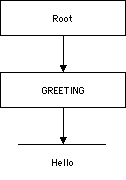
There are exactly three nodes and 13 distinct points in this document. In order the points are:
The point before the root node
The point before the GREETING element node
The point before the text node containing the text "Hello" (as well as assorted white space)
The point before the white space between <GREETING> and Hello.
The point before the first H in Hello
The point between the H and the e in Hello
The point between the e and the l in Hello
The point between the l and the l in Hello
The point between the l and the o in Hello
The point after the o in Hello
The point after the white space between Hello and </GREETING>.
The point after the GREETING element.
The point after the root node.
The exact details of the white space in the document are not considered here. XPointer collapses all runs of white space to a single space.
A point is selected using an XPath expression that points at
a node; then suffixing it with
/point()[position()=n]
where n is
the index of the point following that node that you want.
The index refers to the point before nth child element if the context node is an element or root node, or to the nth character of the string value of the node otherwise.
For example, to
select the point immediately before the D in Domeniquette
Celeste Baudean's NAME element,
/child::FAMILYTREE/descendant::*[position()=1]/child::NAME/child::text()/point()[position()=0]
To select the point after the last e in Domeniquette, since there are 12 letters in Domeniquette,
/child::FAMILYTREE/descendant::*[position()=1]/child::NAME/child::text()/point()[position()=12]
In some applications it may be important to specify a range across a document rather than a particular point in the document. For instance, the selection a user makes with a mouse is not necessarily going to match up with any one element or node. It may start in the middle of one paragraph, extend across a heading and a picture and then into the middle of another paragraph two pages down. Any such contiguous area of a document can be described with a range.
A range begins at one point and continues until another point.
The endpoints of the range are identified by location paths.
If the starting path points to a node set rather than a point, then the first point in the location set the XPointer identifies is the start point.
If the ending location path points to a node set rather than a point, then the last point in the location set the XPointer identifies is the end point of the range.
To specify a range, you append
/range-to(end-point)
to a location path specifying the start point of the range.
The parentheses contain a location path specifying the endpoint of the range.
For example, suppose you want to select everything
between the first PERSON element and the last
PERSON element
xpointer(/child::PERSON[position() = 1]/range-to(/child::PERSON[position() = last()]))
range(location-set) The range is the minimum range necessary to cover the entire location.
range-inside(location-set) Returns a location set containing the interiors of each of the locations in the input.
start-point(location-set) Returns a location set that contains
one point representing the first point of each location in
the input location set.
For example,
start-point(//PERSON[1])
Returns the point immediately before the first PERSON element.
start-point(//PERSON)
returns the set of points immediately before each PERSON element.
end-point(location-set) The same as start-point() except that it returns the
points immediately after each location in its input.
string-range(node-set,substring,index,length)
A string range points to an occurrence of a specified string, or a substring of a given string in the text (not markup) of the document.
string-range()
takes as arguments a node set to search and a substring to
search for.
string-range() returns a node set containing one range for each
non-overlapping match to the string.
By default, the range returned starts before the first matched character and encompasses all the matched characters.
You can also provide optional index and length arguments indicating how many characters after the match the range should start and how many characters after the start the range should continue.
For example, this XPointer finds all occurrences of the string "Harold":
xpointer(string-range(/,"Harold"))
You can change the first argument to specify what nodes you want
to look in. For example, this XPointer finds all occurrences of
the string "Harold" in NAME elements:
xpointer(string-range(//NAME,"Harold"))
String ranges may have node tests. Thus this XPointer finds only the first occurrence of the string "Harold" in the document:
xpointer(string-range(/,"Harold")[position()=1])
This targets the position immediately preceding the word Harold
in Charles Walter Harold's NAME element. This is not
the same as pointing at the entire NAME element as an
element-based selector would do.
A third numeric argument targets a particular position in the string. For example, this targets the point immediately following the first occurrence of the string "Harold" because Harold has six letters:
xpointer(string-range(/,"Harold",6)[position()=1])
An optional fourth argument specifies the number of characters to select. For example, this URI selects the "old" from the first occurrence of the entire string "Harold":
xpointer(string-range(/,"Harold",4,3)[position()=1])
When matching strings, case is considered. All white space is condensed to a single space. Markup characters are ignored.
XPointers may appear in non-XML documents where namespace prefixes are not defined.
You use an xmlns() scheme to
map a prefix to a URI. For example,
xmlns(svg=http://www.w3.org/2000/svg) xpointer(//svg:polygon[3])
A child sequence is a shortcut for XPointers that consist of nothing but a series of child relative location steps counting down from the root node, each of which selects a particular child by position only.
The shortcut is to use only the position number and the slashes that separate individual elements from each other, like this:
http://www.theharolds.com/genealogy.xml#/1/4
/1/4 is a child sequence that says to select the
fourth child element of the first child element of the root.
Child sequences may include an initial ID. In that case the
counting begins from the element with that ID rather than from
the root. For example, John P. Muller's PERSON element has an ID
attribute with the value p4. Consequently the XPointer p4/1
points to his NAME element and p4/2 points to his SPOUSE
element.
Each child sequence always points to a single element. You cannot use child sequences with any other relative location steps. You cannot use them to select elements of a particular type. You cannot use them to select attribute or strings. You can only use them to select a single element by its relative location in the tree.
XPointers refer to particular parts of or locations in XML documents.
The syntax of an XPointer is the keyword xpointer, followed
by parentheses containing an XPath expression that returns a
node set.
The id() function points to an element with a
specified value for an ID type attribute.
Location steps can be chained to make more sophisticated location paths.
Each location step contains an axis, a node test, and zero or more predicates.
Relative location steps select nodes in a document based on their relationship to a context node.
The self axis points to the context node. It
can be abbreviated as a period (.).
The parent axis points to the node that
contains the context node. It can be abbreviated as a double
period (..).
The child axis points to immediate children of
the context node. It can be abbreviated simply by a node test.
The descendant axis points to all elements
contained in the context node. It can be abbreviated as a double
slash (//).
The descendant-or-self axis points to all
elements contained in the context node as well as the context
node itself.
The ancestor axis points to an element that
contains the context node.
The ancestor-or-self axis points to all
elements that contain the context node as well as the context
node itself.
The preceding axis points to any element that
comes before the context node.
The following axis points to any element
following the context node.
The preceding-sibling axis selects from sibling
elements that precede the context node.
The following-sibling axis selects from sibling
elements that follow the context node.
The attribute axis points to an attribute of the context
node. It can be abbreviated as a @ sign.
The node test of a relative location step is normally an
element name, but may also be * to
select all elements, @* to
select all attributes, @name
to select all attributes with the given name,
prefix:* to select all
elements in the specified namespace,
or one of the keywords
comment(), text(),
processing-instruction(), node(),
point() or range().
The optional predicate of a relative location step is an XPath boolean expression enclosed in square brackets that further narrows down the node set the XPointer refers to.
A point indicates a position preceding or following a node or a character.
A range identifies the parsed character data between two points.
The string-range() function points to a
specified block of text.
A child sequence points to an element by counting children from the root.
This presentation: http://www.ibiblio.org/xml/slides/xmloneaustin2001/xlinks
XPointer Specification: http://www.w3.org/TR/xptr
Chapter 17 of the XML Bible: http://www.ibiblio.org/xml/books/bible/updates/17.html
Chapter 10 of XML in a Nutshell
An inband means of specifying the proper URI for a document that can succeed even if out-of-band mechanisms aren't available.
A means of specifying the proper base URI which relative URLs are relative to, even if the document itself is copied to a different location.
An XML replacement for the HTML BASE element
<slide xml:base="http://www.ibiblio.org/xml/slides/xmloneaustin2001/xlinks/">
  <title>The xml:base attribute</title>
  ...
  <previous xlink:type="simple" xlink:href="What_Is_XBase.xml"/>
  <next xlink:type="simple" xlink:href="xbaseexample.xml"/>
</slide>
May be attached to any element to set the base URI for that element and its descendants
The xml prefix is automatically bound
to the http://www.w3.org/XML/1998/namespace URI
The value should be an absolute URI
<COURSE xmlns:xlink="http://www.w3.org/1999/xlink"
         xml:base="http://www.ibiblio.org/javafaq/course/"
         xlink:type="extended">

  <TOC xlink:type="locator" xlink:href="index.html" xlink:label="index"/>

  <CLASS xlink:type="locator" xlink:label="class"
         xlink:href="week1.xml"/>
  <CLASS xlink:type="locator" xlink:label="class"
         xlink:href="week2.xml"/>
  <CLASS xlink:type="locator" xlink:label="class"
         xlink:href="week3.xml"/>
  <CLASS xlink:type="locator" xlink:label="class"
         xlink:href="week4.xml"/>
  <CLASS xlink:type="locator" xlink:label="class"
         xlink:href="week5.xml"/>
  <CLASS xlink:type="locator" xlink:label="class"
         xlink:href="week6.xml"/>
  <CLASS xlink:type="locator" xlink:label="class"
         xlink:href="week7.xml"/>
  <CLASS xlink:type="locator" xlink:label="class"
         xlink:href="week8.xml"/>
  <CLASS xlink:type="locator" xlink:label="class"
         xlink:href="week9.xml"/>
  <CLASS xlink:type="locator" xlink:label="class"
         xlink:href="week10.xml"/>
  <CLASS xlink:type="locator" xlink:label="class"
         xlink:href="week11.xml"/>
  <CLASS xlink:type="locator" xlink:label="class"
         xlink:href="week12.xml"/>
  <CLASS xlink:type="locator" xlink:label="class"
         xlink:href="week13.xml"/>

  <CONNECTION xlink:type="arc" from="index" to="class"/>
  <CONNECTION xlink:type="arc" from="class" to="index"/>

</COURSE>
"index.html" now resolves to the URI "http://www.ibiblio.org/javafaq/course/index.html"
"week1.xml" resolves to the URI "http://www.ibiblio.org/javafaq/course/week1.xml"
"week2.xml" resolves to the URI "http://www.ibiblio.org/javafaq/course/week2.xml"
"week3.xml" resolves to the URI "http://www.ibiblio.org/javafaq/course/week3.xml"
etc.
How does it interact with XHTML? in particular,
the XHTML base
element?
Browser and other application support?
XML Base Specification: http://www.w3.org/TR/xmlbase
The problem is that we're not providing the tools. We're providing the specs. That's a whole different ball game. If tools existed for actually making really interesting use of RDF and XLink and XInclude then people would use them. If IE and/or Mozilla supported the full gamut of specs, from XSLT 1.0 to XLink and XInclude (OK, so they're not quite REC's, but with time...) then you would find people using them more.--Matt Sergeant on the xml-dev mailing list
A means of including one XML document inside another, irrespective of validation.
Based on the XML Infoset; a source infoset is transformed into a result infoset
xlink:show="embed" only graphically includes,
like the IMG element in HTML.
It does not merge infosets.
External parsed entities:
Require a DTD
Can only handle very limited documents; i.e. not all well-formed XML documents are well-formed external parsed entities. In particular XML declarations can be and document type declarations are a problem.
Doesn't allow unparsed text inserted as CDATA
XSLT document() function
Only handles XSLT
No unparsed, pure-text includes
Custom code or XSLT extension functions
href attribute identifies the document (or part thereof)
to be included
In the http://www.w3.org/1999/XML/xinclude
namespace.
The prefix xinclude
is customary.
<book xmlns:xinclude="http://www.w3.org/1999/XML/xinclude">
  <title>Processing XML with Java</title>
  <chapter><xinclude:include href="dom.xml"/></chapter>
  <chapter><xinclude:include href="sax.xml"/></chapter>
  <chapter><xinclude:include href="jdom.xml"/></chapter>
</book>
parse="xml"parse="text"< will change to < and so forth.
<slide xmlns:xinclude="http://www.w3.org/1999/XML/xinclude">
  <title>The href attribute</title>

<ul>
  <li>Identifies the document to be included with a URI</li>
  <li>The document at the URI replaces the <code>include</code>
      element in the including document</li>
  <li>The <code>xinclude</code> prefix is bound to the http://www.w3.org/1999/XML/xinclude
  namespace URI.
  </li>
</ul>

<pre><code><xinclude:include parse="text" href="processing_xml_with_java.xml"/>
</code></pre>

  <description>
      A slide from Elliotte Rusty Harold's XML and Hypertext seminar at
      <host_ref/>, <date_ref/>
    </description>
  <last_modified>October 26, 2000</last_modified>
</slide>
/*--
Copyright 2000 Elliotte Rusty Harold.
All rights reserved.
I haven't yet decided on a license.
It will be some form of open source.
THIS SOFTWARE IS PROVIDED ``AS IS'' AND ANY EXPRESSED OR IMPLIED
WARRANTIES, INCLUDING, BUT NOT LIMITED TO, THE IMPLIED WARRANTIES
OF MERCHANTABILITY AND FITNESS FOR A PARTICULAR PURPOSE ARE
DISCLAIMED. IN NO EVENT SHALL THE APACHE SOFTWARE FOUNDATION OR
ITS CONTRIBUTORS BE LIABLE FOR ANY DIRECT, INDIRECT, INCIDENTAL,
SPECIAL, EXEMPLARY, OR CONSEQUENTIAL DAMAGES (INCLUDING, BUT NOT
LIMITED TO, PROCUREMENT OF SUBSTITUTE GOODS OR SERVICES; LOSS OF
USE, DATA, OR PROFITS; OR BUSINESS INTERRUPTION) HOWEVER CAUSED AND
ON ANY THEORY OF LIABILITY, WHETHER IN CONTRACT, STRICT LIABILITY,
OR TORT (INCLUDING NEGLIGENCE OR OTHERWISE) ARISING IN ANY WAY OUT
OF THE USE OF THIS SOFTWARE, EVEN IF ADVISED OF THE POSSIBILITY OF
SUCH DAMAGE.
*/
package com.macfaq.xml;
import java.net.URL;
import java.net.MalformedURLException;
import java.util.Stack;
import java.util.Iterator;
import java.util.List;
import java.io.File;
import java.io.IOException;
import java.io.InputStreamReader;
import java.io.BufferedInputStream;
import java.io.InputStream;
import org.jdom.Namespace;
import org.jdom.Comment;
import org.jdom.CDATA;
import org.jdom.JDOMException;
import org.jdom.Attribute;
import org.jdom.Element;
import org.jdom.ProcessingInstruction;
import org.jdom.Document;
import org.jdom.input.SAXBuilder;
import org.jdom.output.XMLOutputter;
/**
* <p><code>XIncluder</code> provides methods to
* resolve JDOM elements and documents to produce
* a new Document or Element with all
* XInclude references resolved.
* </p>
*
*
* @author Elliotte Rusty Harold
* @version 1.0d2
*/
public class XIncluder {
public final static Namespace XINCLUDE_NAMESPACE
= Namespace.getNamespace("xinclude", "http://www.w3.org/1999/XML/xinclude");
// No instances allowed
private XIncluder() {}
private static SAXBuilder builder = new SAXBuilder();
/**
* <p>
* This method resolves a JDOM <code>Document</code>
* and merges in all XInclude references.
* If a referenced document cannot be found it is replaced with
* an error message. The Document object returned is a new document.
* The original <code>Document</code> is not changed.
* </p>
*
* @param original <code>Document</code> that will be processed
* @param base <code>String</code> form of the base URI against which
* relative URLs will be resolved. This can be null if the
* document includes an <code>xml:base</code> attribute.
* @return Document new <code>Document</code> object in which all
* XInclude elements have been replaced.
*/
public static Document resolve(Document original, String base)
throws CircularIncludeException, MalformedURLException {
if (original == null) throw new NullPointerException("Document must not be null");
Element root = original.getRootElement();
Element resolved = (Element) resolve(root, base);
// catch a ClassCastException if a String is returned????
// Is the root element allowed to be replaced by
// an xinclude:type="text"
Document result = new Document(resolved, original.getDocType());
Iterator iterator = original.getMixedContent().iterator();
while (iterator.hasNext()) {
Object o = iterator.next();
if (o instanceof Comment) {
Comment c = (Comment) o;
result.addContent((Comment) c.clone());
}
else if (o instanceof ProcessingInstruction) {
ProcessingInstruction pi =(ProcessingInstruction) o;
result.addContent((ProcessingInstruction) pi.clone());
}
}
return result;
}
/**
* <p>
* This method resolves a JDOM <code>Element</code>
* and merges in all XInclude references. This process is recursive.
* The element returned contains no XInclude elements.
* If a referenced document cannot be found it is replaced with
* an error message. The <code>Element</code> object returned is a new element.
* The original <code>Element</code> is not changed.
* </p>
*
* @param original <code>Element</code> that will be processed
* @param base <code>String</code> form of the base URI against which
* relative URLs will be resolved. This can be null if the
* element includes an <code>xml:base</code> attribute.
* @return Object Either an <code>Element</code>
* (<code>xinclude:type="text"</code>) or a <code>String</code>
* (<code>xinclude:type="parse"</code>)
*/
public static Object resolve(Element original, String base)
throws CircularIncludeException, MalformedURLException {
if (original == null) {
throw new NullPointerException("You can't XInclude a null element.");
}
Stack bases = new Stack();
if (base != null) bases.push(base);
Object result = resolve(original, bases);
bases.pop();
return result;
}
private static boolean isIncludeElement(Element element) {
if (element.getName().equals("include") &&
element.getNamespace().equals(XINCLUDE_NAMESPACE)) {
return true;
}
return false;
}
// either returns an Element or a String
protected static Object resolve(Element original, Stack bases)
throws CircularIncludeException {
Element result;
String base = "";
if (bases.size() != 0) base = (String) bases.peek();
if (isIncludeElement(original)) {
Attribute href = original.getAttribute("href");
if (href == null) { // illegal, what kind of exception????
throw new IllegalArgumentException("Missing href attribute");
}
Attribute baseAttribute
= original.getAttribute("base", Namespace.XML_NAMESPACE);
if (baseAttribute != null) base = baseAttribute.getValue();
boolean parse = true;
Attribute parseAttribute = original.getAttribute("parse");
if (parseAttribute != null) {
if (parseAttribute.getValue().equals("text")) parse = false;
}
URL remote;
if (base != null) {
try {
URL context = new URL(base);
remote = new URL(context, href.getValue());
}
catch (MalformedURLException ex) {
return "Unresolvable URL " + base + "/" + href.getValue();
}
}
else {
try {
remote = new URL(href.getValue());
}
catch (MalformedURLException ex) {
return "Unresolvable URL " + href.getValue();
}
}
if (parse) {
// checks for equality (OK) or identity (not OK)????
if (bases.contains(remote.toExternalForm())) {
// need to figure out how to get file and number where
// bad include occurs
throw new CircularIncludeException(
"Circular XInclude Reference to "
+ remote.toExternalForm() + " in " );
}
try {
Document doc = builder.build(remote);
bases.push(remote.toExternalForm());
result = (Element) resolve(doc.getRootElement(), bases);
bases.pop();
}
// Make this configurable
catch (JDOMException e) {
return "Document not found: " + remote.toExternalForm()
+ "\r\n" + e.getMessage();
}
}
else { // insert text
return getURL(remote);
}
}
// not an include element
else { // recursively process children
result = new Element(original.getName(), original.getNamespace());
Iterator attributes = original.getAttributes().iterator();
while (attributes.hasNext()) {
Attribute a = (Attribute) attributes.next();
result.addAttribute((Attribute) a.clone());
}
List children = original.getMixedContent();
Iterator iterator = children.iterator();
while (iterator.hasNext()) {
Object o = iterator.next();
if (o instanceof Element) {
Element e = (Element) o;
Object resolved = resolve(e, bases);
if (resolved instanceof String) {
result.addContent((String) resolved);
}
else result.addContent((Element) resolved);
}
else if (o instanceof String) {
result.addContent((String) o);
}
else if (o instanceof Comment) {
result.addContent((Comment) o);
}
else if (o instanceof CDATA) {
result.addContent((CDATA) o);
}
else if (o instanceof ProcessingInstruction) {
result.addContent((ProcessingInstruction) o);
}
}
}
return result;
}
public static String getURL(URL source) {
StringBuffer s = new StringBuffer();
try {
InputStream in = new BufferedInputStream(source.openStream());
// does XInclude give you anything to specify the character set????
InputStreamReader reader = new InputStreamReader(in, "8859_1");
int c;
while ((c = in.read()) != -1) {
if (c == '<') s.append("<");
else if (c == '&') s.append("&");
else s.append((char) c);
}
return s.toString();
}
catch (IOException e) {
e.printStackTrace();
return "Document not found: " + source.toExternalForm();
}
}
public static void main(String[] args) {
SAXBuilder builder = new SAXBuilder();
XMLOutputter outputter = new XMLOutputter();
for (int i = 0; i < args.length; i++) {
try {
Document input = builder.build(args[i]);
// absolutize URL
String base = args[i];
if (base.indexOf(':') < 0) {
File f = new File(base);
base = f.toURL().toExternalForm();
}
Document output = resolve(input, base);
// need to set encoding on this to Latin-1 and check what
// happens to UTF-8 curly quotes
outputter.output(output, System.out);
}
catch (Exception e) {
System.err.println(e);
e.printStackTrace();
}
}
}
}
/*--
Copyright 2000 Elliotte Rusty Harold.
All rights reserved.
I haven't yet decided on a license.
It will be some form of open source.
THIS SOFTWARE IS PROVIDED "AS IS" AND ANY EXPRESSED OR IMPLIED
WARRANTIES, INCLUDING, BUT NOT LIMITED TO, THE IMPLIED WARRANTIES
OF MERCHANTABILITY AND FITNESS FOR A PARTICULAR PURPOSE ARE
DISCLAIMED. IN NO EVENT SHALL ELLIOTTE RUSTY HAROLD OR ANY
OTHER CONTRIBUTORS TO THIS PACKAGE
BE LIABLE FOR ANY DIRECT, INDIRECT, INCIDENTAL,
SPECIAL, EXEMPLARY, OR CONSEQUENTIAL DAMAGES (INCLUDING, BUT NOT
LIMITED TO, PROCUREMENT OF SUBSTITUTE GOODS OR SERVICES; LOSS OF
USE, DATA, OR PROFITS; OR BUSINESS INTERRUPTION) HOWEVER CAUSED AND
ON ANY THEORY OF LIABILITY, WHETHER IN CONTRACT, STRICT LIABILITY,
OR TORT (INCLUDING NEGLIGENCE OR OTHERWISE) ARISING IN ANY WAY OUT
OF THE USE OF THIS SOFTWARE, EVEN IF ADVISED OF THE POSSIBILITY OF
SUCH DAMAGE.
*/
package com.macfaq.xml;
import java.net.URL;
import java.net.MalformedURLException;
import java.util.Stack;
import org.xml.sax.SAXException;
import java.io.File;
import java.io.IOException;
import java.io.InputStreamReader;
import java.io.BufferedInputStream;
import java.io.InputStream;
import org.w3c.dom.Element;
import org.w3c.dom.Document;
import org.w3c.dom.Attr;
import org.w3c.dom.Node;
import org.w3c.dom.NodeList;
import org.w3c.dom.DocumentType;
import org.w3c.dom.DOMImplementation;
import org.apache.xerces.parsers.DOMParser;
import org.apache.xml.serialize.OutputFormat;
import org.apache.xml.serialize.XMLSerializer;
/**
* <p><code>DOMXIncluder</code> provides methods to
* resolve DOM elements and documents to produce
* a new <code>Document</code> or <code>Element</code> with all
* XInclude references resolved.
* </p>
*
*
* @author Elliotte Rusty Harold
* @version 1.0d1
*/
public class DOMXIncluder {
public final static String XINCLUDE_NAMESPACE
= "http://www.w3.org/1999/XML/xinclude";
// No instances allowed
private DOMXIncluder() {}
private static DOMParser parser = new DOMParser();
/**
* <p>
* This method resolves a DOM <code>Document</code>
* and merges in all XInclude references.
* If a referenced document cannot be found it is replaced with
* an error message. The <code>Document</code>
* object returned is a new document.
* The original <code>Document</code> object is not changed.
* </p>
*
* @param original <code>Document</code> that will be processed
* @param base <code>String</code> form of the base URI against which
* relative URLs will be resolved. This can be null if the
* document includes an <code>xml:base</code> attribute.
* @return Document new <code>Document</code> object in which all
* XInclude elements have been replaced.
* @throws CircularIncludeException if this document possesses a cycle of
* XIncludes.
* @throws NullPointerException if the original argument is null.
*/
public static Document resolve(Document original, String base)
throws CircularIncludeException, NullPointerException {
if (original == null) {
throw new NullPointerException("Document must not be null");
}
Element root = original.getDocumentElement();
// catch a ClassCastException if a Text is returned????
// Is the root element allowed to be replaced by
// an parse="text"
DOMImplementation impl = original.getImplementation();
DocumentType oldDoctype = original.getDoctype();
DocumentType newDoctype = impl.createDocumentType(
oldDoctype.getName(),
oldDoctype.getPublicId(),
oldDoctype.getSystemId());
Document resultDocument
= impl.createDocument(root.getNamespaceURI(),
root.getTagName(),
newDoctype);
// check that tag name is qualified name
NodeList children = original.getChildNodes();
for (int i = 0; i < children.getLength(); i++) {
Node n = children.item(i);
if (n instanceof Element) { // root element
resultDocument.replaceChild(
resolve(root, base, resultDocument),
resultDocument.getDocumentElement()
);
}
else if (n instanceof DocumentType) {
// skip it, already cloned
}
else {
resultDocument.appendChild(n.cloneNode(true));
}
}
return resultDocument;
}
/**
* <p>
* This method resolves a DOM <code>Element</code>
* and merges in all XInclude references. This process is recursive.
* The element returned contains no XInclude elements.
* If a referenced document cannot be found it is replaced with
* an error message. The <code>Element</code> object returned is a new element.
* The original <code>Element</code> is not changed.
* </p>
*
* @param original <code>Element</code> that will be processed
* @param base <code>String</code> form of the base URI against which
* relative URLs will be resolved. This can be null if the
* element includes an <code>xml:base</code> attribute.
* @param resolved <code>Document</code> into which the resolved element will be placed.
* @return Node Either an <code>Element</code>
* (<code>parse="text"</code>) or a <code>Text</code>
* (<code>parse="xml"</code>)
* @throws CircularIncludeException if this <code>Element</code> contains an XInclude element
* that attempts to include a document in which
* this element is directly or indirectly included.
* @throws NullPointerException if the original argument is null.
*/
public static Node resolve(Element original, String base, Document resolved)
throws CircularIncludeException, NullPointerException {
if (original == null) {
throw new NullPointerException(
"You can't XInclude a null element."
);
}
Stack bases = new Stack();
if (base != null) bases.push(base);
Node result = resolve(original, bases, resolved);
bases.pop();
return result;
}
private static boolean isIncludeElement(Element element) {
if (element.getLocalName().equals("include") &&
element.getNamespaceURI().equals(XINCLUDE_NAMESPACE)) {
return true;
}
return false;
}
/**
* <p>
* This method resolves a DOM <code>Element</code>
* and merges in all XInclude references. This process is recursive.
* The element returned contains no XInclude elements.
* If a referenced document cannot be found it is replaced with
* an error message. The <code>Element</code> object returned is a new element.
* The original <code>Element</code> is not changed.
* </p>
*
* @param original <code>Element</code> that will be processed
* @param bases <code>Stack</code> containing the string forms of
* all the URIs of doucments which contain this element
* through XIncludes. This used to detect if a circular
* reference is being used.
* @param resolved <code>Document</code> into which the resolved element will be placed.
* @return Node Either an <code>Element</code>
* (<code>parse="text"</code>) or a <code>String</code>
* (<code>parse="xml"</code>)
* @throws CircularIncludeException if this <code>Element</code> contains an XInclude element
* that attempts to include a document in which
* this element is directly or indirectly included.
* @throws IllegalArgumentException if the href attribute is missing from an include element.
*/
private static Node resolve(Element original, Stack bases, Document resolved)
throws CircularIncludeException, IllegalArgumentException {
Element result;
String base = "";
if (bases.size() != 0) base = (String) bases.peek();
if (isIncludeElement(original)) {
String href = original.getAttribute("href");
if (href == null || href.equals("")) { // illegal, what kind of exception????
throw new IllegalArgumentException("Missing href attribute");
}
String baseAttribute
= original.getAttributeNS("http://www.w3.org/XML/1998/namespace", "base");
if (base != null && !base.equals("")) {
base = baseAttribute;
}
boolean parse = true;
String parseAttribute = original.getAttribute("parse");
if (parseAttribute != null && parseAttribute.equals("text")) {
parse = false;
}
String remote;
if (base != null) {
try {
URL context = new URL(base);
URL u = new URL(context, href);
remote = u.toExternalForm();
}
catch (MalformedURLException ex) {
return resolved.createTextNode("Unresolvable URL "
+ base + "/" + href);
}
}
else {
remote = href;
}
if (parse) {
// checks for equality (OK) or identity (not OK)????
if (bases.contains(remote)) {
// need to figure out how to get file and number where
// bad include occurs
throw new CircularIncludeException(
"Circular XInclude Reference to "
+ remote + " in " );
}
try {
parser.parse(remote);
Document doc = parser.getDocument();
bases.push(remote);
result = (Element) resolve(doc.getDocumentElement(), bases, resolved);
bases.pop();
}
// Make this configurable
catch (SAXException e) {
return resolved.createTextNode("Document "
+ remote + " is not well-formed.\r\n" + e.getMessage());
}
catch (IOException e) {
return resolved.createTextNode("Document not found: "
+ remote + "\r\n" + e.getMessage());
}
}
else { // insert text
String s = downloadTextDocument(remote);
return resolved.createTextNode(s);
}
}
// not an include element
else { // recursively process children
// still need to adjust bases here????
result = (Element) resolved.importNode(original, false);
NodeList children = original.getChildNodes();
for (int i = 0; i < children.getLength(); i++) {
Node n = children.item(i);
if (n instanceof Element) {
Element e = (Element) n;
result.appendChild(resolve(e, bases, resolved));
}
else {
result.appendChild(resolved.importNode(n,true));
}
}
}
return result;
}
/**
* <p>
* This utility method reads a document at a specified URL
* and returns the contents of that document as a <code>Text</code>.
* It's used to include files with <code>parse="text"</code>
* </p>
*
* <p>
* If the document cannot be located due to an IOException,
* then an error message string is returned. I'm not yet convinced this
* is the right behavior. Perhaps I should pass on the exception?
* </p>
*
* @param url URL of the doucment that will be stored in
* <code>String</code>.
* @return Text The document retrieved from the source <code>URL</code>
* or an error message if the document can't be retrieved.
* Note: throwing an exception might be better here. I should
* at least allow the setting of the eror message.
*/
public static String downloadTextDocument(String url) {
URL source;
try {
source = new URL(url);
}
catch (MalformedURLException ex) {
return "Unresolvable URL " + url;
}
StringBuffer s = new StringBuffer();
try {
InputStream in = new BufferedInputStream(source.openStream());
// does XInclude give you anything to specify the character set????
InputStreamReader reader = new InputStreamReader(in, "8859_1");
int c;
while ((c = in.read()) != -1) {
if (c == '<') s.append("<");
else if (c == '&') s.append("&");
else s.append((char) c);
}
return s.toString();
}
catch (IOException e) {
return "Document not found: " + source.toExternalForm();
}
}
/**
* <p>
* The driver method for the XIncluder program.
* I'll probably move this to a separate class soon.
* </p>
*
* @param args <code>args[0]</code> contains the URL or file name
* of the document to be procesed.
*/
public static void main(String[] args) {
DOMParser parser = new DOMParser();
XMLSerializer outputter = new XMLSerializer();
for (int i = 0; i < args.length; i++) {
try {
parser.parse(args[i]);
Document input = parser.getDocument();
// absolutize URL
String base = args[i];
if (base.indexOf(':') < 0) {
File f = new File(base);
base = f.toURL().toExternalForm();
}
Document output = resolve(input, base);
// need to set encoding on this to Latin-1 and check what
// happens to UTF-8 curly quotes
OutputFormat format = new OutputFormat("XML", "ISO-8859-1", false);
format.setPreserveSpace(true);
XMLSerializer serializer
= new XMLSerializer(System.out, format);
serializer.serialize(output);
}
catch (Exception e) {
System.err.println(e);
e.printStackTrace();
}
}
}
}
XML Base Proposed Recommendation: http://www.w3.org/TR/xmlbase
XInclude Working Draft: http://www.w3.org/TR/xinclude
XPointer Working Draft: http://www.w3.org/TR/xptr
XPath Specification: http://www.w3.org/TR/xpath
 XML in a Nutshell
Elliotte Rusty Harold and W. Scott Means
O'Reilly & Associates, 2001
ISBN 0-596-00058-8
XPath: http://www.oreilly.com/catalog/xmlnut/chapter/ch09.html
 XML Bible, second edition
Elliotte Rusty Harold
Hungry Minds, 2001
ISBN 0-7645-4760-7
XLinks: http://www.ibiblio.org/xml/books/bible/updates/16.html
XPointers: http://www.ibiblio.org/xml/books/bible/updates/17.html